
Nissan Sentra Service Manual: Trunk room trim
Exploded View
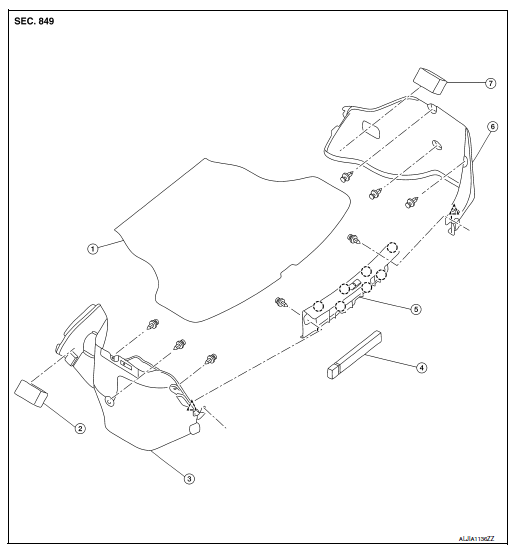
- Trunk floor trim
- Trunk front floor spacer (LH)
- Trunk side finisher (LH)
- Reflector box assembly*
- Trunk rear plate
- Trunk side finisher (RH)
- Trunk front floor spacer (RH)
 Clip
Clip
 Pawl
Pawl
Trunk rear plate
TRUNK REAR PLATE : Removal and Installation
REMOVAL
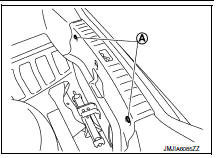
- Remove trunk floor trim.
- Remove clips (A).
- Release trunk rear plate pawls as shown.
 Pawl
Pawl
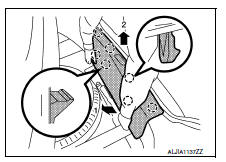
- Remove trunk rear plate.
INSTALLATION
Installation is in the reverse order of removal.
CAUTION:
When installing, check that clips and pawls are accurately aligned with the holes on body panel, then press in.
Trunk side finisher
TRUNK SIDE FINISHER : Removal and Installation
REMOVAL
- Remove trunk rear plate. Refer to INT-42, "TRUNK REAR PLATE : Removal and Installation".
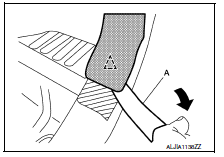
- Apply protective tape (A) to protect the component from damage as shown.
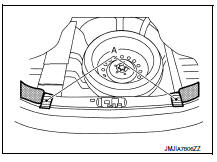
- Release trunk side finisher clips using a suitable tool (A).
 : Clip
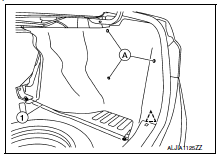
- Remove trunk side finisher clips (A) and the trunk side finisher (1).
 : Clip
INSTALLATION
Installation is in the reverse order of removal.
CAUTION:
- Insert rear end of trunk side finisher into trunk weather strip.
- When installing, check that clips are accurately aligned with the holes on body panel, then press in.
 Headlining
Exploded View
STANDARD ROOF
Headlining
Assist grip
Map lamp bracket
Sun visor (RH)
Sun visor cover
Sun visor holder
Map lamp
Sun visor (LH)
Interior room lamp
Assist grip cap ...
 Trunk lid trim
Exploded View
Trunk lid finisher
Front
Removal and Installation
REMOVAL
Remove trunk lid finisher clips (A) and trunk lid finisher.
INSTALLATION
Installation is in the reverse ord ...
Other materials:
Plug
Description
Replace the O-ring if oil leakage or exudes from the plug.
Exploded View
Plug
O-ring
O-ring
Plug
: Always replace after every
disassembly.
: NВ·m (kg-m, ft-lb)
: NВ·m (kg-m, in-lb)
: Genuine NISSAN CVT Fluid NS-3
Removal and Installation
NOTE:
Replace ...
Using the system
The NISSAN Voice Recognition system allows
hands-free operation of the Bluetooth® Phone
System.
If the vehicle is in motion, some commands may
not be available so full attention may be given to
vehicle operation.
Initialization
When the ignition switch is placed in the ON
position, NISSAN ...
U1000 CAN Comm circuit
DTC Logic
DTC DETECTION LOGIC
DTC
Display Item
Malfunction detected condition
Possible causes
U1000
CAN COMM CIRCUIT
When CAN communication signal is not continuously
received for 2 seconds or more
CAN communication system malfunction
Diagnosis Procedure
...
