
Nissan Sentra Owners Manual: NISSAN Intelligent Key® (if so equipped)
Your vehicle can only be driven with the Intelligent Keys which are registered to your vehicle’s Intelligent Key components and NISSAN Vehicle Immobilizer System components.
Never leave these keys in the vehicle.
As many as 4 Intelligent Keys can be registered and used with one vehicle. The new keys must be registered by a NISSAN dealer prior to use with the Intelligent Key and NISSAN Vehicle Immobilizer System of your vehicle. Since the registration process requires erasing all memory in the Intelligent Key components when registering new keys, be sure to take all Intelligent Keys that you have to the NISSAN dealer.
CAUTION
Listed below are conditions or occurrences which will damage the Intelligent Key:
- Do not allow the Intelligent Key, which contains electrical components, to come into contact with water or salt water. This could affect the system function.
- Do not drop the Intelligent Key.
- Do not strike the Intelligent Key sharply against another object.
- Do not change or modify the Intelligent Key.
- Wetting may damage the Intelligent Key. If the Intelligent Key gets wet, immediately wipe until it is completely dry.
- Do not place the Intelligent Key for an extended period in an area where temperatures exceed 140°F (60°C).
- Do not attach the Intelligent Key with a key holder that contains a magnet.
- Do not place the Intelligent Key near equipment that produces a magnetic field, such as a TV, audio equipment and personal computers.
If an Intelligent Key is lost or stolen, NISSAN recommends erasing the ID code of that Intelligent Key from the vehicle.
This may prevent the unauthorized use of the Intelligent Key to operate the vehicle.
For information regarding the erasing procedure, contact a NISSAN dealer.
Mechanical key
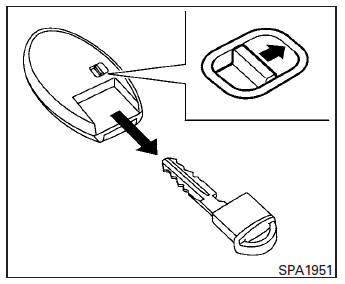
The Intelligent Key contains the mechanical key.
To remove the mechanical key, release the lock knob on the back of the Intelligent Key.
To install the mechanical key, firmly insert it into the Intelligent Key until the lock knob returns to the lock position.
Use the mechanical key to lock or unlock the driver’s door.
CAUTION
Always carry the mechanical key installed in the Intelligent Key slot.
See “Doors� in this section.
 Keys
Keys
Remote keyless entry keyfob (if so equipped)
Integrated door lock keyfob
Key number plate
CAUTION
Do not leave the ignition key inside the
vehicle when you leave the vehicle.
A key num ...
 NISSAN Vehicle Immobilizer System keys
You can only drive your vehicle using the master
keys which are registered to the NISSAN Vehicle
Immobilizer System components in your vehicle.
These keys have a transponder chip in the key
head ...
Other materials:
Excessive abs function operation
frequency
Diagnosis Procedure
1.CHECK START
Check front and rear brake force distribution using a brake
tester.
Is the inspection result normal?
YES >> GO TO 2
NO >> Check brake system.
2.CHECK FRONT AND REAR AXLE
Make sure that there is no excessive play in the front and rear
axles. ...
Starting system (with intelligent key)
Wiring Diagram
...
Vehicle recovery (freeing a stuck vehicle)
Front (if so equipped)
Do not use the hook to tow the vehicle.
Remove the cover bumper bracket using a
flat screwdriver or any flat tool.
To protect the bumper body, place a piece of
cloth between the tool and the vehicle.
The tool used should be inserted by the
lower portion of t ...
