
Nissan Sentra Service Manual: Basic inspection
Diagnosis and repair workflow
Work Flow
Overall sequence
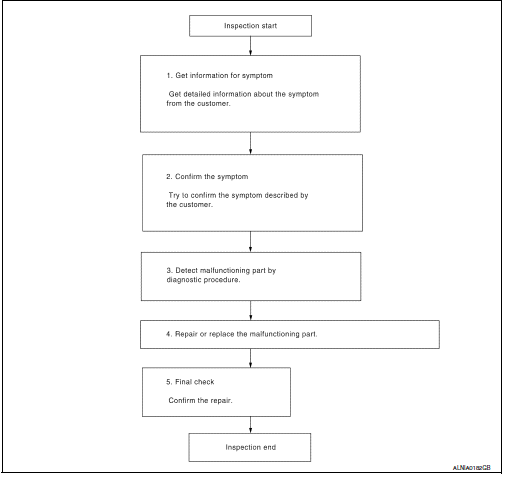
Detailed flow
1.Get information for symptom
Get detailed information from the customer about the symptom (the condition and the environment when the incident/malfunction occurred).
>> GO TO 2.
2.Confirm the symptom
Try to confirm the symptom described by the customer. Verify relation between the symptom and the condition when the symptom is detected.
>> Go to 3.
3.Detect malfunctioning part by diagnostic procedure
Inspect according to Diagnostic Procedure of the system.
Is malfunctioning part detected? YES >> GO TO 4.
NO >> GO TO 2.
4.Repair or replace the malfunctioning part
- Repair or replace the malfunctioning part.
- Reconnect parts or connectors disconnected during diagnostic procedure.
>> GO TO 5.
5.Final check
Refer to confirmed symptom in step 2, and make sure that the symptom is not detected.
Was the repair confirmed? Yes >> inspection end.
No >> go to 2.
 Wiring diagram
Display audio without bose
Wiring diagram
...
 Dtc/circuit diagnosis
Power supply and ground circuit
Audio unit
AUDIO UNIT : Diagnosis Procedure
Regarding wiring diagram information, refer to av-88, "wiring diagram".
1.Check fuse
Check that the following ...
Other materials:
Ducts and grilles
Exploded View
Heating and cooling unit assembly
Center ventilator duct
Defroster duct
Side ventilator duct (LH)
Front floor duct (LH)
Rear floor connecting duct (LH)
Rear floor duct (LH)
Rear floor duct nozzle (LH)
Rear floor duct nozzle (RH)
Rear floor duct (RH)
Rear flo ...
Diagnosis and repair workflow
Work flow
Overall sequence
Detailed flow
1. Obtain information about symptom
Interview the customer to obtain as much information as possible about the
conditions and environment under
which the malfunction occurred.
>> GO TO 2.
2. Confirm concern
Check the malfunction on the veh ...
Precaution for Harness Repair
Solder the repair part, and wrap it with tape. [Twisted wire
fray
must be 110 mm (4.33 in) or less.]
Do not bypass the repair point with wire. (If it is
bypassed, the turnout
point cannot be separated and the twisted wire characteristics
are lost.)
...
