
Nissan Sentra Owners Manual: System features
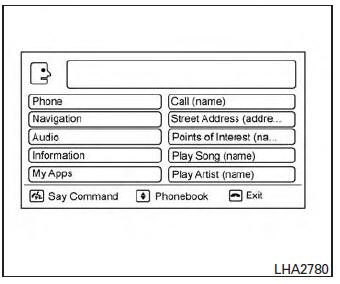
NISSAN Voice Recognition can activate the following systems:
- Bluetoothâ„¢ Hands-Free Phone System
- Navigation
- Audio
- Information
- My Apps
For additional information on the navigation system, see the separate Navigation System Owner’s Manual.
How to say numbers
NISSAN Voice Recognition requires a certain way to speak numbers in voice commands. Refer to the following examples.
General rule: Either “zero� or “oh� can be used for “0�.
Phone numbers
Speak phone numbers according to the following example. For 1-800-662-6200, say dial number and then speak the phone number in any of the following formats:
- “one eight oh oh six six two six two oh oh�
- “one eight hundred six six two six two oh oh�
- “one eight zero zero six six two six two oh oh�
For the best voice recognition phone dialing results, say phone numbers as single digits. Also, full numbers can only be spoken for “800�. For example, you cannot say 555-6000 as “five five five six thousand�.
 Using the system
Initialization
When the ignition switch is in the ON position,
NISSAN Voice Recognition is initialized, which
takes a few seconds. When completed, the system
is ready to accept voice commands. If
...
 Bluetooth® Hands-Free Phone System voice commands
To access the Bluetooth® Hands-Free Phone
System voice commands:
Press the button.
Say “Call� and then a name in the vehicle
phonebook to call that entry. Otherwise, say
“Phone� t ...
Other materials:
P2101 Electric throttle control function
DTC Logic
DTC DETECTION LOGIC
NOTE:
If DTC P2101 is displayed with DTC P2100, first perform the trouble
diagnosis for DTC P2100. Refer
to EC-423, "DTC Logic".
If DTC P2101 is displayed with DTC P2119, first perform the trouble
diagnosis for DTC P2119. Refer
to EC-430, &qu ...
System description
Component parts
Component parts location
Ipdm e/r (contains ignition relay-1)
Bcm (view with instrument panel removed)
Fuse block (j/b) (front)
Fuse block (j/b) (back)
Blower relay
Ignition relay-2
Accessory relay-1
Push-button ignition switch
Component description
...
Warning/indicator lights
Warning
light
Name
Anti-lock Braking
System (ABS) warning
light
Brake warning light
Charge warning light
Door open warning
light
Engine oil pressure
warning light
Low fuel ...
