
Nissan Sentra Owners Manual: Using the system
Initialization
When the ignition switch is in the ON position,
NISSAN Voice Recognition is initialized, which
takes a few seconds. When completed, the system
is ready to accept voice commands. If
the  button is pressed before the
initialization
completes, the system will announce: “Voice
Recognition System not ready. Please wait.�
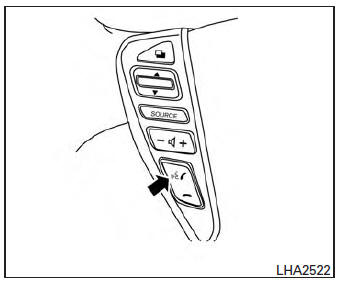
Giving voice commands
- Press the
 button.
 - The system announces: “Please say a category like phone or a command like points of interest followed by a brand name�. A list of available commands is then spoken by the system.
- After the tone sounds and the face icon on
the display changes, speak a command.
Available commands are discussed in this section.
- Voice and display feedback are provided when the command is accepted.
- If the command is not recognized, the system
announces: “Command not recognized�.
Repeat the command in a clear voice.
- If you want to cancel the command or go
back to the previous menu of commands,
press the
 button. The system
will announce: “Cancelling voice recognition� or “Go back� depending on the current menu level. - Press the BACK button on the control panel to move back through the menus displayed on the screen.
- If you want to adjust the volume of the voice feedback, use the volume control switches on the steering wheel or the volume knob on the control panel.
- The voice command screen can also be accessed using the control panel display:
- Press the [
 ] button.
 - Touch the “Voice Commands� key.
Operating tips
To get the best performance out of NISSAN Voice Recognition, observe the following:
- Keep the interior of the vehicle as quiet as possible. Close the windows to eliminate the surrounding noises (traffic noises, vibration sounds, etc.), which may prevent the system from recognizing the voice commands correctly.
- Wait until a tone sounds before speaking a command. Otherwise, the command will not be received properly.
- Start speaking a command within 3.5 seconds after the tone sounds.
- Speak in a natural voice without pausing between words.
 NISSAN Voice Recognition System (if so
equipped)
NISSAN Voice Recognition System (if so
equipped)
The NISSAN Voice Recognition system allows
hands-free operation of the systems equipped on
this vehicle, such as the phone and navigation
systems.
To operate NISSAN Voice Recognition, press
the ...
 System features
NISSAN Voice Recognition can activate the following
systems:
Bluetoothâ„¢ Hands-Free Phone System
Navigation
Audio
Information
My Apps
For additional information on the navigation ...
Other materials:
Abs branch line circuit
Diagnosis procedure
1.Check connector
Turn the ignition switch OFF.
Disconnect the battery cable from the negative terminal.
Check the terminals and connectors of the abs actuator and electric unit
(control unit) for damage, bend
and loose connection (unit side and connector side).
...
Precaution for Brake System
WARNING:
Clean any dust from the front brake and rear brake with a vacuum
dust collector. Do not blow with
compressed air.
Brake fluid: Refer to MA-11, "Fluids and Lubricants".
Do not reuse drained brake fluid.
Do not spill or splash brake fluid on painted surfaces. Brake fluid ...
Front wiper motor ground circuit
Diagnosis procedure
Regarding Wiring Diagram information, refer to WW-24, "Wiring Diagram - With
Intelligent Key" or WW-29,
"Wiring Diagram - Without Intelligent Key".
1.Check front wiper motor (gnd) open circuit
Turn the ignition switch OFF.
Disconnect front wiper mot ...
