
Nissan Sentra Service Manual: Steering gear and linkage
Exploded View
REMOVAL
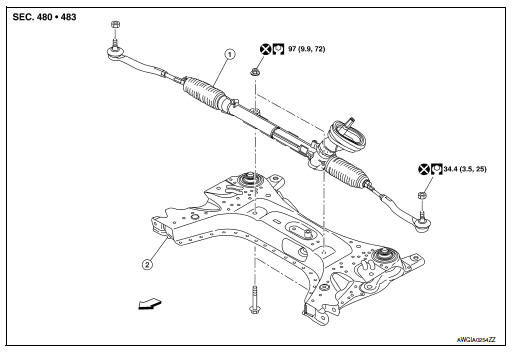
-
Steering gear assembly
-
Front suspension member
 Front
Front
Removal and Installation
REMOVAL
-
Set steering wheel to the straight-ahead position.
-
Remove floor cover (1).
-
Lower shaft assembly (2).
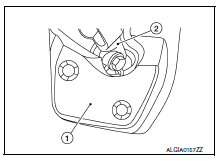
-
Remove the lower shaft assembly bolt and position the lower shaft assembly out of the way. Refer to ST- 12, "Removal and Installation".
CAUTION:
-
Spiral cable may be cut if steering wheel turns while separating steering column assembly and steering gear assembly. Always fix the steering wheel using string to avoid turning.
-
Place a matching mark on both intermediate shaft and steering gear assembly before removing intermediate shaft.
-
Remove wheels and tires using power tool. Refer to WT-47, "Adjustment".
-
Remove steering outer socket from steering knuckle so as not to damage ball joint boot using Tool.
Tool number : HT72520000 (J-25730-A)
CAUTION:
Temporarily tighten the nut to prevent damage to threads and to prevent the Tool from a sudden drop.
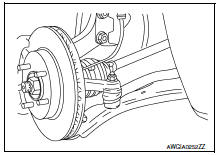
-
Remove front suspension member. Refer to FSU-16, "Removal and Installation".
-
Remove steering gear assembly from front suspension member.
INSTALLATION
Installation is in the reverse order of removal.
CAUTION:
Spiral cable may be cut if steering wheel turns while separating steering column assembly and steering gear assembly. Always fix the steering wheel using string to avoid turning.
-
Perform final tightening of nuts and bolts on each part under unladen conditions with tires on level ground when removing steering gear assembly.
-
Check wheel alignment. Refer to FSU-7, "Adjustment".
-
Rotate steering wheel to check for decentered condition, binding, noise or excessive steering effort.
-
Do not reuse steering outer socket nut and steering gear assembly nut.
-
Perform neutral position steering angle adjustment. Refer to BRC-54, "Work Procedure".
 Steering column
Exploded View
Steering column assembly
Slide plates
lower shaft assembly
Removal and Installation
REMOVAL
CAUTION:
While removing the steering column assembly, do not ...
 Unit disassembly and assembly
Steering gear and linkage
Exploded View
Outer socket
Boot clamp (small diameter)
Boot
Boot clamp (large diameter)
Inner socket
Gear housing assembly
Disassembl ...
Other materials:
Rear power window motor
Removal and Installation
REMOVAL
Remove the rear door glass regulator (1). Refer to GW-21,
"Removal and Installation"
Remove the screws and the rear power window motor (2).
INSTALLATION
Installation is in the reverse order of removal. ...
Removal and installation
Bcm (body control module)
Removal and Installation
Note:
Before replacing bcm, perform “read configuration” to save or print
current vehicle specification. Refer
to bcs-116, "configuration (bcm) : description".
Removal
Disconnect the negative battery terminal. Refer to ...
P0715 Input speed sensor A
DTC Logic
DTC DETECTION LOGIC
DTC
CONSULT screen terms
(Trouble diagnosis content)
DTC detection condition
Possible causes
P0715
INPUT SPEED SENSOR A
(Input/Turbine Speed Sensor
A Circuit)
The primary speed sensor value is less than
150 r ...
