
Nissan Sentra Service Manual: Main power window and door lock/ unlock switch
Removal and Installation
REMOVAL
- Release the pawls using a suitable tool and lift the main power window and door lock/unlock switch and finisher as an assembly and remove.
- Disconnect the harness connector from the main power window and door lock/unlock switch.
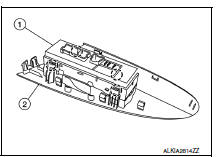
- Release the four pawls (two on each side) using a suitable tool, then separate the main power window and door lock/unlock switch (1) from the main power window and door lock switch finisher (2).
 : Pawl
CAUTION:
Do not bend back the pawls on the switch finisher too far or breakage may occur.
INSTALLATION
Installation is in the reverse order of removal.
NOTE:
When the main power window and door lock/unlock switch is disconnected from the harness connector it is necessary to perform the initialization procedure. Refer to PWC-29, "Work Procedure".

 Power window and door lock/unlock switch RH
Removal and Installation
REMOVAL
Release the pawls using a suitable tool and lift the power window and
door lock/unlock switch RH and finisher
as an assembly and remove.
Disconnect the har ...
Other materials:
Precaution
Precaution for Supplemental Restraint System (SRS) "AIR BAG" and "SEAT
BELT PRE-TENSIONER"
The Supplemental Restraint System such as “AIR BAG” and “SEAT BELT PRE-TENSIONER”,
used along
with a front seat belt, helps to reduce the risk or severity of injur ...
P1551, P1552 Battery current sensor
DTC Logic
DTC DETECTION LOGIC
DTC No.
CONSULT screen terms
(Trouble diagnosis content)
DTC detecting condition
Possible cause
P1551
BAT CURRENT SENSOR
(Battery current sensor)
An excessively low voltage from the sensor
is sent to ECM.
Harness or ...
P0130 A/F Sensor 1
DTC Logic
DTC DETECTION LOGIC
To judge the malfunction, the diagnosis checks that the A/F signal computed
by ECM from the A/F sensor 1
signal fluctuates according to fuel feedback control.
DTC No.
CONSULT screen terms
(Trouble diagnosis content)
DTC detecting condition
Possi ...
