
Nissan Sentra Service Manual: Diagnosis system (bcm) (without intelligent key system)
Common item
COMMON ITEM : CONSULT Function (BCM - COMMON ITEM)
APPLICATION ITEM
CONSULT performs the following functions via CAN communication with BCM.
| Direct Diagnostic Mode | Description |
| ECU identification | The BCM part number is displayed. |
| Self Diagnostic Result | The BCM self diagnostic results are displayed. |
| Data Monitor | The BCM input/output data is displayed in real time. |
| Active Test | The BCM activates outputs to test components. |
| Work support | The settings for BCM functions can be changed. |
| Configuration |
|
| CAN DIAG SUPPORT MNTR | The result of transmit/receive diagnosis of CAN communication is displayed. |
SYSTEM APPLICATION
BCM can perform the following functions.
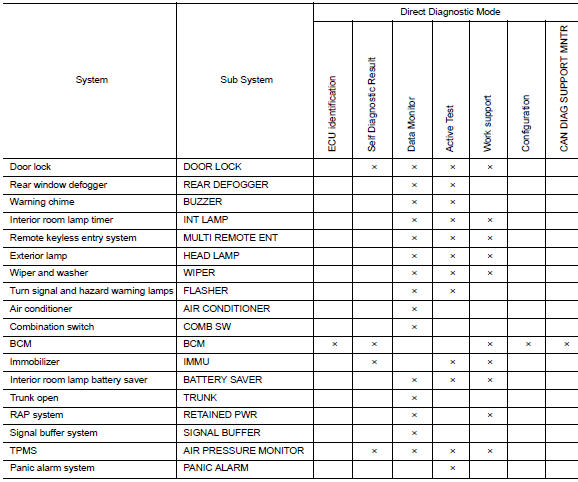
Int lamp
Int lamp : consult function (bcm - int lamp)
DATA MONITOR
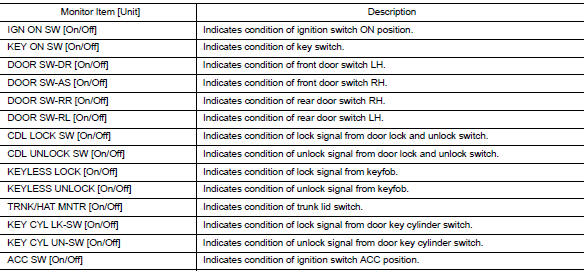
ACTIVE TEST

WORK SUPPORT
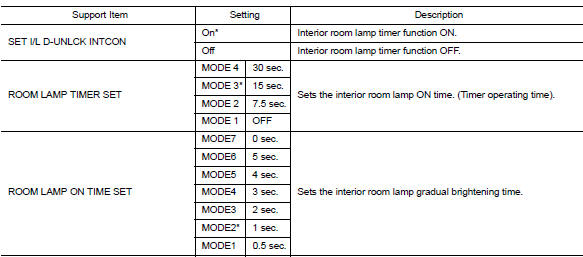
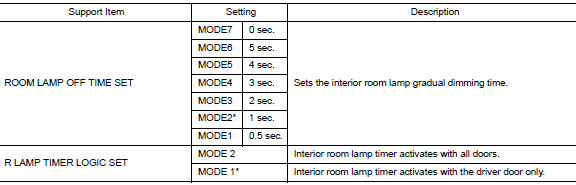
* : Initial setting
Battery saver
Battery saver : consult function (bcm - battery saver)
DATA MONITOR
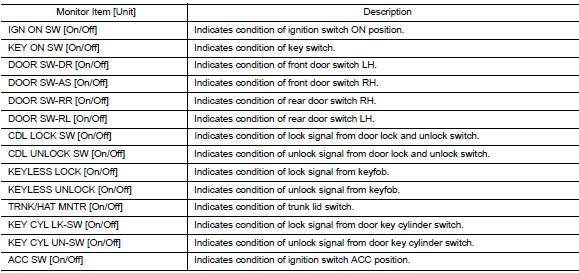
ACTIVE TEST

WORK SUPPORT

* : Initial setting
 Diagnosis system (bcm) (with intelligent key system)
Common item
COMMON ITEM : CONSULT Function (BCM - COMMON ITEM)
APPLICATION ITEM
CONSULT performs the following functions via CAN communication with BCM.
Direct Diagnostic Mode
Descriptio ...
 Ecu diagnosis information
BCM
List of ECU Reference
...
Other materials:
TCM
Exploded View
Bracket
TCM
: Vehicle front
: NВ·m (kg-m, in-lb)
Removal and Installation
CAUTION:
When replacing TCM, note the “CVTF DETERIORATION DATE” value
displayed on CONSULT “CONFORM
CVTF DETERIORTN” in MAINTENANCE BOOKLET, before start the opera ...
How to Follow Test Groups in Trouble Diagnosis
Test group number and test group title
Test group number and test group title are shown in the upper portion of
each test group.
Work and diagnosis procedure
Start to diagnose a problem using procedures indicated in enclosed test
groups.
Questions and results
...
C1601 Battery power supply
DTC Logic
DTC DETECTION LOGIC
DTC
Display item
Malfunction detected condition
Possible cause
C1601
BATTERY VOLT
When a power supply voltage to the EPS control unit
is maintained at 17.5 V or more or at less than 9 V
continuously for five second or more.
...
