
Nissan Sentra Service Manual: Cluster lid C
Removal and Installation - Cluster Lid C
REMOVAL
- Remove cluster lid C lower. Refer to IP-20, "Removal and Installation - Cluster Lid C Lower".
- Remove the cluster lid C screws (A).
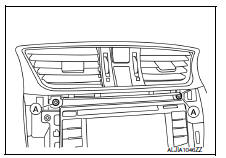
- Disconnect the harness connector from cluster lid C.
- Remove the center ventilator grilles assembly and hazard switch from the
cluster lid C (if necessary).
Refer to VTL-9, "CENTER VENTILATOR GRILLE : Removal and Installation" (Center Ventilator Grilles) and EXL-129, "Removal and Installation" (Hazard Switch).
INSTALLATION
Installation is in the reverse order of removal.
Removal and Installation - Cluster Lid C Lower
REMOVAL
- Release cluster lid C lower clips and pawls using a suitable tool.
 Pawl
Pawl
 Metal clip
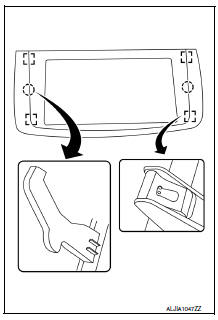
- Remove cluster lid C lower.
INSTALLATION
Installation is in the reverse order of removal.
 Cluster lid A
Removal and Installation
REMOVAL
Release cluster lid A clips and pawls using a suitable tool.
: Pawl
Metal clip
Remove cluster lid A.
INSTALLATION
Installation is in the reverse ...
 Instrument lower panel lH
Removal and Installation
REMOVAL
Remove the instrument side finisher LH (1) using a suitable tool.
Remove the hood and fuel filler handle assembly from the instrument
lower panel LH. ...
Other materials:
Component parts
Meter system
METER SYSTEM : Component Parts Location
ABS actuator and electric unit (control
unit)
Combination meter
CVT shift selector (with CVT)
(O/D OFF switch)
Air bag diagnosis sensor unit
(view with center console assembly removed)
Parking brake switch
(view with ...
The illumination control switch is inoperative
Description
If any of the following malfunctions is found for the illumination control
switch operation.
All switches are inopera
The specified switch cannot be operated
Diagnosis procedure
1.Check illumination control switch signal circuit
Check the illumination control switch signal ...
Steering gear and linkage
Exploded View
REMOVAL
Steering gear assembly
Front suspension member
Front
Removal and Installation
REMOVAL
Set steering wheel to the straight-ahead position.
Remove floor cover (1).
Lower shaft assembly (2).
Remove the lower shaft assembly bo ...
