
Nissan Sentra Service Manual: Removal and installation
BCM
Removal and installation
Note:
Before replacing BCM, perform “READ CONFIGURATION” to save or print current vehicle specification. Refer to BCS-61, "CONFIGURATION (BCM) : Description".
Removal
- Disconnect the negative battery terminal. Refer to pg-52, "removal and installation".
- Remove instrument lower panel LH and instrument side finisher LH. Refer to IP-21, "Removal and Installation".
- Remove fuse block (j/b) screws (a) and position (bcm) aside.
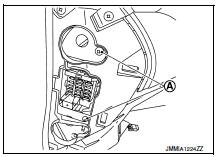
- Remove harness clip (a).
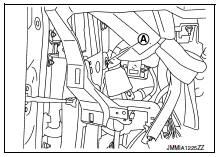
- Remove the screws (a) from the bcm (1).
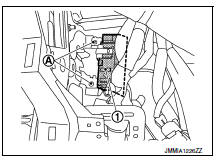
- Disconnect the harness connectors and remove the bcm.
Installation
Installation is in the reverse order of removal.
Caution:
- Perform “configuration (bcm)” when replacing bcm. Refer to bcs-61, "configuration (bcm) : description"
- Be sure to perform the system initialization (nats) when replacing bcm. Refer to bcs-60, "additional service when replacing control unit (bcm) : work procedure".
- When replacing bcm, if new bcm does not come with keyfobs attached, all existing keyfobs must be re-registered. Refer to the consult immobilizer mode and follow the on-screen instructions.
Combination switch
Exploded view
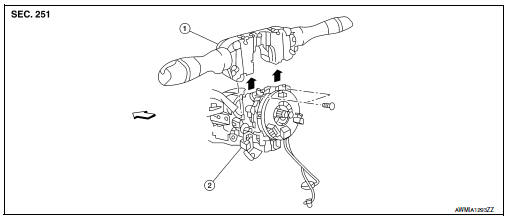
- Combination switch
- Combination switch harness connector
 Front
Front
Note:
Shown with the steering wheel removed for clarity only.
Removal and installation
Removal
Caution:
- Before servicing, turn the ignition switch off, disconnect both battery terminals and wait at least three minutes.
- Do not use air or electric tools when removing or installing the combination switch.
- Disconnect both the negative and positive battery terminals, then wait at least three minutes. Refer to pg- 50, "removal and installation (battery)".
- Remove the steering column covers. Refer to ip-16, "removal and installation".
- Rotate steering wheel clockwise to access first combination switch bolt and remove.
- Rotate steering wheel counter-clockwise to access second combination switch bolt and remove.
- Disconnect the harness connector from the combination switch and remove.
Installation
Installation is in the reverse order of removal.
Caution:
- After the work is completed, make sure no system malfunction is detected by air bag warning lamp.
- In case a malfunction is detected by the air bag warning lamp, reset with the self-diagnosis function and delete the memory with consult.
- If a malfunction is still detected after the above operation,
perform self-diagnosis to repair malfunctions.
Refer to src-41, "additional service when replacing control unit : special repair requirement".
 Symptom diagnosis
Combination switch system symptoms
Symptom Table
Perform the data monitor of consult to check for any malfunctioning
item.
Check the malfunction combinations.
Identify the malfunct ...

Other materials:
Symptom diagnosis
Squeak and rattle trouble diagnoses
Work Flow
Customer interview
Interview the customer if possible, to determine the conditions that exist
when the noise occurs. Use the Diagnostic
Worksheet during the interview to document the facts and conditions when the
noise occurs and any
custome ...
P0863 TCM Communication
DTC Logic
DTC DETECTION LOGIC
DTC
CONSULT screen terms
(Trouble diagnosis content)
DTC detection condition
Possible causes
P0863
TCM COMMUNICATION
(TCM Communication Circuit)
An error is detected at the initial CAN diagnosis of TCM.
TCM
DTC CONFIRMATIO ...
Tire chains
CAUTION
Tire chains/cables should not be installed
on P205/50R17 size tires. Installation of
the tire chains/cables on P205/50R17 size
tires will cause damage to the vehicle. If
you plan to use tire chains/cables, you
should install P205/55R16 size tires on
your vehicle.
Use of tire chains m ...
