
Nissan Sentra Service Manual: Oil filter
Removal and Installation
REMOVAL
- Remove engine under cover. Refer to EXT-16, "Exploded View".
- Drain engine oil. Refer to LU-8, "Draining".
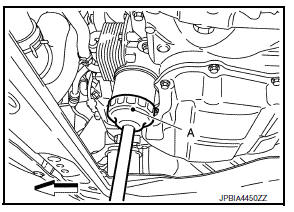
- Remove the oil filter using Tool (A) as shown.
: Front
Tool number : KV10115801 (J-38956)
WARNING:
Be careful not to burn yourself, as the engine oil may be hot.
CAUTION:
- When removing, prepare a shop cloth to absorb any oil leaks or spills.
- Do not allow engine oil to adhere to the drive belts.
- Completely wipe off any oil that adheres to the engine and the vehicle.
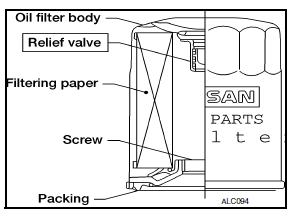
- The oil filter is provided with a relief valve. Use a Genuine NISSAN oil filter or equivalent.
INSTALLATION
- Remove foreign materials adhering to the oil filter installation surface.
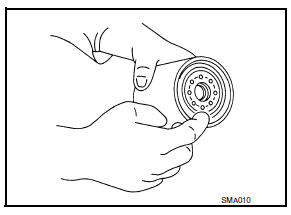
- Apply new engine oil to the oil seal contact surface of new oil filter.
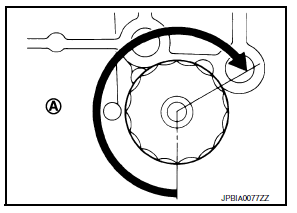
- Screw oil filter manually until it touches the installation surface, then tighten it by 2/3 turn (A), or tighten to specification.
Oil filter : 18.0 NВ·m (1.8 kg-m, 13 ft-lb)
Tool number : KV10115801 (J-38956)
- Refill engine with new engine oil. Refer to LU-9, "Refilling".
- Install engine under cover. Refer to EXT-16, "Exploded View".
Inspection
INSPECTION AFTER INSTALLATION
- Check the engine oil level. Refer to LU-7, "Inspection".
- Start the engine, and check that there are no leaks of engine oil.
- Stop the engine and wait for 10 minutes.
- Check the engine oil level, and adjust the level. Refer to LU-7, "Inspection".
 Engine oil
Inspection
Engine oil level
Note:
Before starting engine, put vehicle horizontally and check the engine oil
level. If engine is already started, stop
it and allow 10 minutes before checking.
...
 Removal and installation
OIL COOLER
Exploded View
M/T models
Clamp
Water hose
Clamp
Water hose
Oil cooler
O-rings
CVT models
Clamp
Water hose
Clamp
Water hose
Water hose clip
Oil coole ...
Other materials:
Removal and installation
Hood
Hood assembly
Hood assembly : exploded view
Hood hinge (LH/RH)
Hood assembly
Hood bumper rubber
Hood seal
Hood insulator
Hood support rod
Hood support rod clamp
Clip
Hood assembly : removal and installation
CAUTION:
Use two people when removing or installin ...
Precaution for Supplemental Restraint System (SRS) "AIR BAG" and "SEAT BELT
PRE-TENSIONER"
The Supplemental Restraint System such as “AIR BAG” and “SEAT BELT PRE-TENSIONER”,
used along
with a front seat belt, helps to reduce the risk or severity of injury to the
driver and front passenger for certain
types of collision. Information necessary to service the system ...
Symptom diagnosis
Squeak and rattle trouble diagnoses
Work Flow
CUSTOMER INTERVIEW
Interview the customer if possible, to determine the conditions that exist
when the noise occurs. Use the Diagnostic
Worksheet during the interview to document the facts and conditions when the
noise occurs and any
custom ...
