
Nissan Sentra Service Manual: Diagnosis system (BCM) (without intelligent key system)
Common item
COMMON ITEM : CONSULT Function (BCM - COMMON ITEM)
Application item
Consult performs the following functions via can communication with bcm.
| Direct diagnostic mode | Description |
| Ecu identification | The BCM part number is displayed. |
| Self diagnostic result | The bcm self diagnostic results are displayed. |
| Data monitor | The BCM input/output data is displayed in real time. |
| Active test | The bcm activates outputs to test components |
| Work support | The settings for bcm functions can be changed. |
| Configuration |
|
| Can diag support mntr | The result of transmit/receive diagnosis of can communication is displayed. |
System application
BCM can perform the following functions.
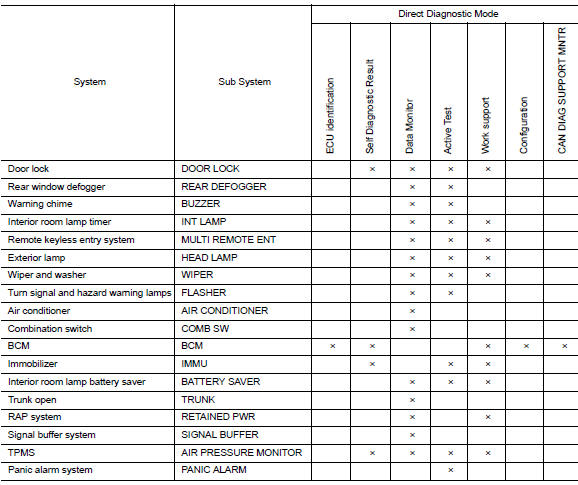
Headlamp
Headlamp : consult function (bcm - head lamp)
Data monitor
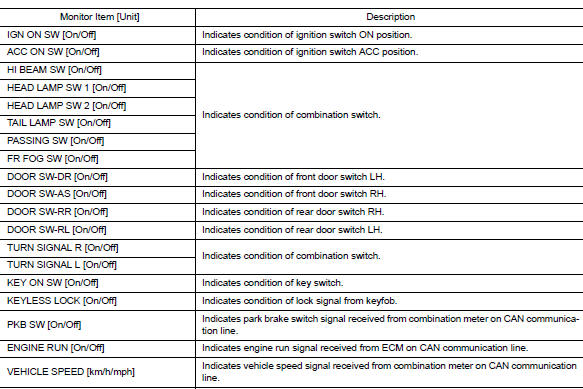
Active test

Work support

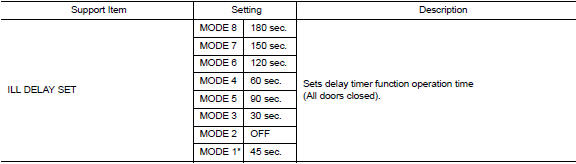
* : Initial setting
Flasher
Flasher : consult function (bcm - flasher)
Data monitor

Active test

 Diagnosis system (bcm) (with intelligent key system)
Common item
Common item : consult function (bcm - common item)
Application item
Consult performs the following functions via can communication with bcm.
Direct diagnostic mode
Descriptio ...
 Diagnosis system (ipdm e/r) (with intelligent key system)
Diagnosis description
Auto active test
Description
In auto active test, the IPDM E/R sends a drive signal to the following
systems to check their operation.
Front wiper (lo, hi)
Parking lam ...
Other materials:
Engine compartment
CAUTION
Never use a fuse of a higher or lower
amperage rating than specified on the
fuse box cover. This could damage the
electrical system or cause a fire.
If any electrical equipment does not come on,
check for an open fuse.
Be sure the ignition switch and the headlight
switch are ...
Basic inspection
Diagnosis and repair workflow
Work Flow
OVERALL SEQUENCE
DETAILED FLOW
1. OBTAIN INFORMATION ABOUT SYMPTOM
Interview the customer to obtain as much information as possible about the
conditions and environment under
which the malfunction occurred.
>> GO TO 2.
2. CONFIRM THE SYMPTO ...
Precaution for Work
When removing or disassembling each component, be careful not to damage
or deform it. If a component
may be subject to interference, be sure to protect it with a shop cloth.
When removing (disengaging) components with a screwdriver or similar
tool, be sure to wrap the component
with a ...
