
Nissan Sentra Owners Manual: Cargo net (if so equipped)
WARNING
|
The cargo net helps keep packages in the cargo area from moving around while the vehicle is in motion.
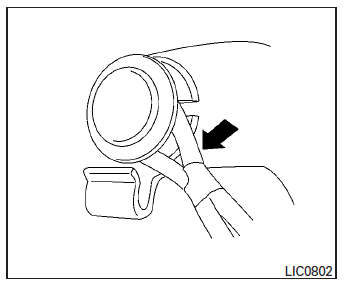
To install the cargo net, attach the net to the retainers.
To remove the cargo net, detach the net from the cargo net retainers.
 Slide front armrest (if so equipped)
To adjust the front armrest, take the leather cover
and slide it to the front or rear.
...
 Windows
Power windows
WARNING
Make sure that all passengers have
their hands, etc. inside the vehicle while
it is in motion and before closing the
windows. Use the window lock switch t ...
Other materials:
P1652 Starter motor system comm
Description
ECM controls ON/OFF state of the starter relay, according to the engine and
vehicle condition. ECM transmits
a control signal to IPDM E/R via BCM by CAN communication.
Under normal conditions, ECM controls and maintains the starter relay in OFF
state during following condition:
...
G Sensor
Exploded View
G sensor
Bracket
Vehicle front
NВ·m (kg-m, ft-lb)
NВ·m (kg-m, in-lb)
Removal and Installation
WARNING:
Do not leave any objects (screwdrivers, tools, etc.) on the seat during
seat repair. It can lead to personal
injury if the side air bag module should acc ...
Basic inspection
DIAGNOSIS AND REPAIR WORKFLOW
Work Flow
OVERALL SEQUENCE
DETAILED FLOW
1.INTERVIEW CUSTOMER
Interview the customer to obtain as much information as possible about the
conditions and environment under
which the malfunction occurred.
>> GO TO 2.
2.SYMPTOM CHECK
Verify symptoms.
...
