
Nissan Sentra Owners Manual: Windows
Power windows
WARNING
|
The power windows operate when the ignition switch is placed in the ON position, or for a period of time after the ignition switch is placed in the OFF position. If the driver’s or passenger’s door is opened during this period of time, the power to the windows is canceled.
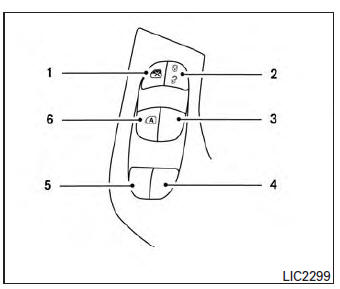
- Window lock button
- Power door lock switch
- Front passenger side switch
- Right rear passenger side switch
- Left rear passenger side switch
- Driver side automatic switch
Driver’s side power window switch
The driver’s side control panel is equipped with switches to open or close all of the windows.
To open a window, push the switch to the first detent and continue to hold down until the desired window position is reached. To close a window, pull the switch to the first detent and continue to hold up until the desired window position is reached.
Front passenger’s power window switch
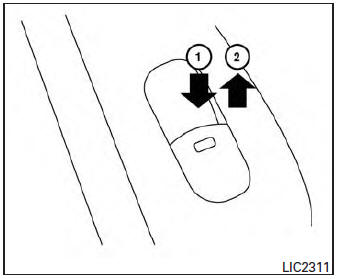
The passenger’s window switch operates only the corresponding passenger’s window. To open the window, push the switch to the first detent and continue to hold it down until the desired window position is reached 1 . To close the window, pull the switch to the first detent and continue to hold it up until the desired window position is reached 2 .
Rear power window switch
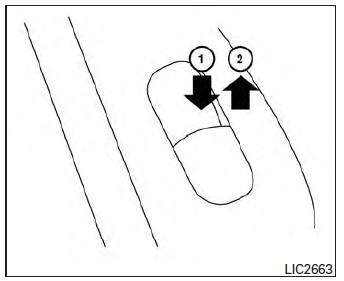
The rear power window switches open or close only the corresponding windows. To open the window, push the switch and hold it down 1 . To close the window, pull the switch up 2 .
Locking passengers’ windows
When the window lock button is depressed, only the driver’s side window can be opened or closed. Push it again to cancel the window lock function.
Automatic operation
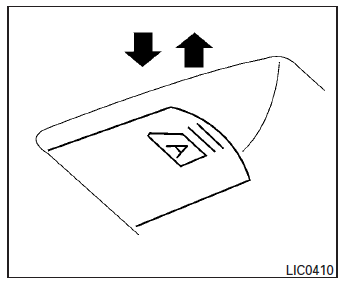
To fully open a window equipped with automatic operation, press the window switch down to the second detent and release it; it need not be held.
The window automatically opens all the way. To stop the window, lift the switch up while the window is opening.
To fully close a window equipped with automatic operation, pull the switch up to the second detent and release it; it need not be held. The window automatically closes all the way. To stop the window, press the switch down while the window is closing.
Auto-reverse function
The auto-reverse function can be activated when a window is closed by automatic operation.
Depending on the environment or driving conditions, the auto-reverse function may be activated if an impact or load similar to something being caught in the window occurs.
| WARNING There are some small distances immediately before the closed position which cannot be detected. Make sure that all passengers have their hands, etc., inside the vehicle before closing the window. |
If the vehicle’s battery is disconnected, replaced, or jump started, the power window auto-reverse function may not operate properly. If this occurs, please contact the dealer to re-initialize the power window auto-reverse system.
If the control unit detects something caught in a window equipped with automatic operation as it is closing, the window will be immediately lowered.
When the automatic operation for the driver’s power window switch does not operate
If the automatic operation for the driver’s power window switch does not operate properly, perform the following procedure to initialize the power window switch.
- Place the ignition switch in the ON position.
- Press and hold the driver’s window switch down until the window opens completely.
- Release the switch.
- Pull and hold the driver’s window switch up to the second detent until the window glass has reached the full close position. Continue to hold the window switch in the up position for 5 seconds after the window glass has reached the full close position. (It is necessary for this entire step to be completed with one continuous pull of the window switch.)
- Release the switch
Initialization is now complete. The automatic operation for the driver’s power window switch should now operate.
If the automatic operation does not operate properly after performing the above procedure, see a NISSAN dealer for assistance.
No initialization is required for all the other window switches.
 Cargo net (if so equipped)
WARNING
Properly secure all cargo with ropes or
straps to help prevent it from sliding or
shifting. In a sudden stop or collision,
unsecured cargo could cause personal
injur ...
 Moonroof (if so equipped)
Power moonroof
The moonroof will only operate when the ignition
switch is placed in the ON position. The power
moonroof is operational for a period of time, even
if the ignition switch is plac ...
Other materials:
B1428 Seat belt buckle switch LH
Description
DTC B1428 SEAT BELT BUCKLE SWITCH LH
The air bag diagnosis sensor unit monitors the seat belt buckle switch LH
status. If the control unit detects an
open or short condition in the circuit, it will set the DTC.
PART LOCATION
Refer to SRC-5, "Component Parts Location".
...
Fuel-filler cap
WARNING
Gasoline is extremely flammable and
highly explosive under certain conditions.
You could be burned or seriously
injured if it is misused or mishandled.
Always stop the engine and do not
smoke or allow open flames or sparks
near the vehicle when refuelin ...
Recommended fluids/lubricants and capacities
The following are approximate capacities. The actual refill capacities may
be slightly different. When refilling, follow the procedure
described in the “Maintenance and do-it-yourself� section to determine the
proper refill capacity.
...
