
Nissan Sentra Service Manual: Wiper blade
Wiper blade
WIPER BLADE : Removal and Installation
REMOVAL
- Put the wiper arms in the service position.
- Turn the ignition switch ON and then OFF.
- Within 1 minute, activate washer switch 2 times in less than 0.5 seconds to put the wiper arms in the service position.
- Lift the wiper arm away from the windshield glass.
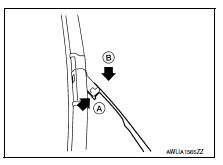
- Rotate the wiper blade and push the release tab (A), then move the wiper blade down (B) the wiper arm.
- Remove the wiper blade.
INSTALLATION
CAUTION:
Return the wiper arm to the service position on the windshield to prevent damage when the hood is opened.
- Insert the wiper blade onto the wiper arm and slide it up until it clicks into place.
- Rotate the wiper blade so the dimple is in the groove.
- Lay the wiper arm back down in the service position on the windshield.
- Turn the ignition ON and operate the windshield wipers to ensure the
repair has been completed properly.
Operating the windshield wipers will cancel service mode.
- Check that the wiper blade contacts the windshield properly; otherwise the wiper arm may be damaged from wind pressure while driving.
Wiper blade refill
Wiper blade refill : removal and installation
REMOVAL
- Remove the wiper blade. Refer to WW-58, "WIPER BLADE : Removal and Installation".
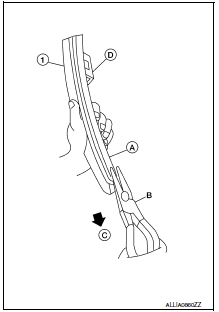
- Hold the wiper blade refill lip at the end (A) of the wiper blade (1)
with a suitable tool (B) as shown and pull it firmly in the direction
(C).
(D): U clip (part of wiper blade)
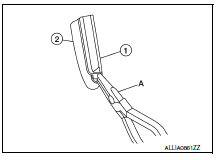
- If the wiper blade refill lip is torn due to wear, insert a suitable tool (A) into the space between the end of the wiper blade refill (1) and the wiper blade (2) and pull the wiper blade refill (1) out as shown.
INSTALLATION
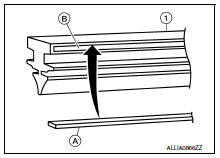
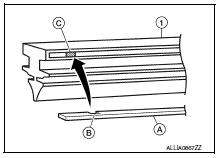
- If the rib (A) has become detached from the wiper blade refill (1), check that the curve of the rib (A) is in the same direction as the curve of the wiper blade refill (1) and insert the rib (A) into the slit (B) in the wiper blade refill (1) as shown.
- If the rib (A) has a notch (B), insert the rib (A) into the wiper blade refill (1) so the notch (B) fits over the protrusion (C) in the wiper blade refill (1) as shown.
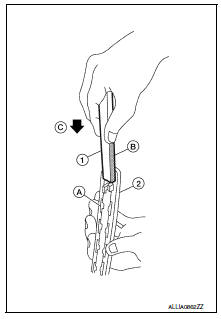
- Insert the wiper blade refill (1) tip into the end of the wiper blade
(2) in the direction (C). Push the wiper blade refill (1) in while
pressing it into the end of the wiper blade (2) as shown. After the
wiper blade refill is fully inserted, remove the holder (B).
(A): Tab (part of wiper blade) (2)
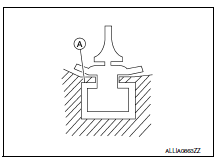
- Make sure to slide the refill into the wiper blade so that the wiper blade refill is held by the tabs (A) on the wiper blade as shown.
- Push the wiper blade refill (1) until the tabs on the wiper blade
(2) fit into the stoppers (A) in the end of the wiper blade refill (1).
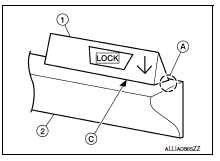
Make sure the LOCK mark (B) on the wiper blade refill (1) is aligned with the lock point symbol (C) on the wiper blade (2) as shown.
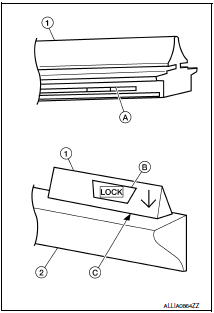
- Before installing the wiper blade, make sure that the wiper blade refill (1) end is fully covered by the wiper blade (2) in area (A) as shown.
- Install the wiper blade. Refer to WW-58, "WIPER BLADE : Removal and Installation".
 Front wiper arm
Exploded View
Wiper blade (RH)
Wiper arm (RH)
Wiper drive assembly
Wiper arm (LH)
Wiper blade (LH)
Removal and Installation
REMOVAL
Remove the wiper arm cap.
Remove the wipe ...
 Front wiper drive assembly
Exploded view
Wiper blade (RH)
Wiper arm (RH)
Wiper drive assembly
Wiper arm (LH)
Wiper blade (LH)
Removal and installation
REMOVAL
Remove the cowl top. Refer to EXT-26, " ...
Other materials:
Symptom diagnosis
The sport mode indicator lamp does not turn on
Description
The sport mode indicator lamp does not turn on when the sport mode switch is
operated.
Diagnosis procedure
1.Perform combination meter on board diagnosis
Perform combination meter on board diagnosis. Refer to mwi-16, "descriptio ...
P1588 G Sensor
DTC Logic
DTC DETECTION LOGIC
DTC
CONSULT screen terms
(Trouble diagnosis content)
DTC detection condition
Possible causes
P1588
G Sensor
(Gravity Sensor Circuit)
When the following diagnosis conditions are
satisfied and the detection conditi ...
Precaution for Supplemental Restraint System (SRS) "AIR BAG" and "SEAT BELT
PRE-TENSIONER"
The Supplemental Restraint System such as “AIR BAG” and “SEAT BELT
PRE-TENSIONER”, used along
with a front seat belt, helps to reduce the risk or severity of injury to the
driver and front passenger for certain
types of collision. Information necessary to service the system ...
