
Nissan Sentra Owners Manual: USB interface (models with Navigation System)
Connecting a device to the USB input jack
| WARNING Do not connect, disconnect, or operate the USB device while driving. Doing so can be a distraction. If distracted you could lose control of your vehicle and cause an accident or serious injury. |
CAUTION
- Do not force the USB device into the USB port. Inserting the USB device tilted or up-side-down into the port may damage the port. Make sure that the USB device is connected correctly into the USB port.
- Do not grab the USB port cover (if so equipped) when pulling the USB device out of the port. This could damage the port and the cover.
- Do not leave the USB cable in a place
where it can be pulled unintentionally.
Pulling the cable may damage the port.
Refer to your device manufacturer’s owner information regarding the proper use and care of the device.
The USB input jack is located in the center console.
Insert the USB device into the jack 1 .
When a compatible storage device is plugged into the jack, compatible audio files on the storage device can be played through the vehicle’s audio system.
Audio file operation
AUX button:
Place the ignition switch in the ON or ACC position and press the AUX button to switch to the USB input mode. If another audio source is playing and a USB memory device is inserted, press the AUX button until the center display changes to the USB memory mode.
If the system has been turned off while the USB memory was playing, push the ON-OFF/VOL control knob to restart the USB memory.
Play information:
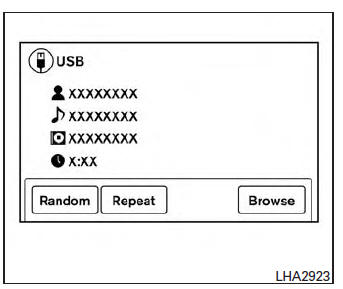
Information about the audio files being played is shown on the display screen of the vehicle’s audio system. Touch “Browse� to display the list of categories that can be used to narrow the search. Touch the name of a song on the screen to begin playing that song.
 Seeking buttons:
Press the  button while an audio
file on the
USB device is playing to return to the beginning
of the current track. Press the 
button several
times to skip backward several tracks.
Press the  button while an audio
file on the
USB device is playing to advance one track.
Press the  button several times to
skip forward
several tracks. If the last track in a folder on
the USB device is skipped, the first track of the
next folder is played.
Random and repeat play mode:
While files on a USB device are playing, the play pattern can be altered so that songs are repeated or played randomly.
Random:
Touch the “Random� key to apply a random play pattern to the USB device. To cancel Random mode, touch the “Random� key again.
Repeat:
Touch the “Repeat� key to apply a repeat play pattern to the USB device. To cancel Repeat mode, touch the “Repeat� key again.
 USB interface (models without Navigation System) (if so equipped)
Connecting a device to the USB input
jack
WARNINGDo not connect, disconnect, or operate the
USB device while driving. Doing so can be
a distraction. If distracted you could lose
...
 iPod®* player operation without Navigation System (if so equipped)
Connecting iPod®
WARNINGDo not connect, disconnect or operate the
USB device while driving. Doing so can be
a distraction. If distracted you could lose
control of your vehicle an ...
Other materials:
General maintenance
Explanation of general maintenance
General maintenance includes those items which should be checked during the
normal day-to-day operation
of the vehicle. They are essential if the vehicle is to continue operating
properly. The owners can perform
checks and inspections themselves or have thei ...
Clutch pedal
Inspection and Adjustment
INSPECTION
The Height of Clutch Pedal
Pull back the floor trim and remove front floor spacer (LH) for access
to floor panel.
Check that the clutch pedal height (H1) from the floor panel (1) is
within the reference value.
Clutch pedal height
(H1)
Replace ...
Front door
Door assembly
Door assembly : removal and installation
CAUTION:
Use two people when removing or installing the front door assembly
due to its heavy weight.
When removing and installing front door assembly, support front
door using a suitable tool.
Do not use air tools or electric to ...
