
Nissan Sentra Owners Manual: USB interface (models without Navigation System) (if so equipped)
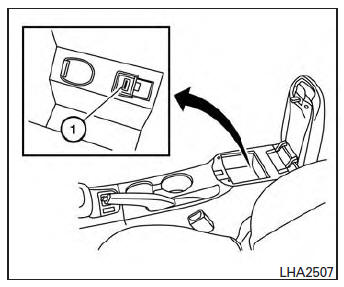
Connecting a device to the USB input jack
| WARNING Do not connect, disconnect, or operate the USB device while driving. Doing so can be a distraction. If distracted you could lose control of your vehicle and cause an accident or serious injury. |
CAUTION
- Do not force the USB device into the USB port. Inserting the USB device tilted or up-side-down into the port may damage the port. Make sure that the USB device is connected correctly into the USB port.
- Do not grab the USB port cover (if so equipped) when pulling the USB device out of the port. This could damage the port and the cover.
- Do not leave the USB cable in a place
where it can be pulled unintentionally.
Pulling the cable may damage the port.
Refer to your device manufacturer’s owner information regarding the proper use and care of the device.
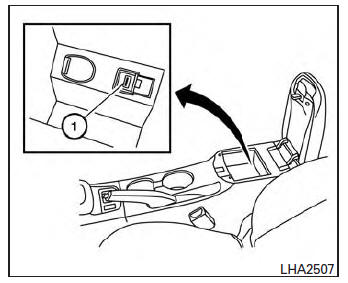
The USB input jack is located in the center console.
Insert the USB device into the jack 1 .
When a compatible storage device is plugged into the jack, compatible audio files on the storage device can be played through the vehicle’s audio system.
Audio file operation
AUX button:
Place the ignition switch in the ON or ACC position and press the AUX button to switch to the USB input mode. If a CD is playing or another audio source is plugged in through the AUX IN jack, the AUX button toggles between the three sources.
Play information:
Information about the audio files being played can be displayed on the display screen of the vehicle’s audio system. Depending on how the audio files are encoded, information such as Folder, Song and Artist will be displayed.
The track number and number of total tracks in the folder are displayed on the screen as well.
 SEEK/CAT
(Reverse or
Fast Forward) buttons:
Press and hold the SEEK/CAT buttons

or  for 1.5 seconds while an audio
file on
the USB device is playing to reverse or fast
forward the track being played. The track plays at
an increased speed while reversing or fast forwarding.
When the button is released, the audio file returns to normal play speed.
 SEEK/CAT
buttons:
Press the SEEK/CAT button  while
while
an audio
file on the USB device is playing to return to
the beginning of the current track. Press the
SEEK/CAT button  several times to
skip
backward several tracks.
Press the SEEK/CAT button  while an
audio
file on the USB device is playing to advance
one track. Press the SEEK/CAT button

several times to skip forward several tracks. If the
last track in a folder on the USB device is
skipped, the first track of the next folder is played.
RDM button:
When the RDM button is pressed while an audio file on the USB device is playing, the play pattern can be changed as follows:
All Random → 1 Folder Random → OFF
All Random: all tracks on the USB device will be played randomly.
1 Folder Random: all tracks in the current folder will be played randomly.
OFF: No random play pattern is applied. The indicator on the display will turn off.
The current play pattern of the USB device is displayed on the screen unless no pattern is applied.
RPT button:
When the RPT button is pressed while an audio file on the USB device is playing, the play pattern can be changed as follows: 1 Folder Repeat → 1 Track Repeat → OFF
1 Track Repeat: the current track will be repeated.
1 Folder Repeat: the current folder will be repeated.
OFF: No repeat play pattern is applied. The indicator on the display will turn off.
The current play pattern of the USB device is displayed on the screen unless no pattern is applied.
TUNE/SCROLL knob:
If there are multiple folders with audio files on the USB device, turn the TUNE/SCROLL knob to change folders. Turn the knob to the left to skip back a folder. Turn the knob to the right to skip ahead a folder. If there is only one folder of audio files on the USB device, turning the TUNE/SCROLL knob in either direction will return to the first track on the USB device.
 FM/AM/SAT radio with compact disc (CD) player (Type B) (if so equipped)
For all operation precautions, see “Audio operation
precautions� in this section.
Audio main operation
ON-OFF button / VOL (volume) control
knob:
Place the ignition switch in the ACC or ON
p ...
 USB interface (models with Navigation System)
Connecting a device to the USB input
jack
WARNINGDo not connect, disconnect, or operate the
USB device while driving. Doing so can be
a distraction. If distracted you could lose
...
Other materials:
Unit removal and installation
TRANSAXLE ASSEMBLY
Exploded View
Transaxle assembly
Refer to INSTALLATION
Removal and Installation
WARNING:
Do not remove the radiator cap when the engine is hot. Serious burns
could occur from high pressure
coolant escaping from the radiator. Wrap a thick cloth around the cap. ...
Door handle
Front door handle
Front door handle : exploded view
Outside handle bracket
Front gasket
Outside handle
Intelligent key button
Door key cylinder rod
Inside handle assembly
Rear gasket
Front door handle : removal and installation - inside handle
REMOVAL
Remove front door ...
B0091 Front side air bag satellite sensor LH
Description
DTC B0091 FRONT SATELLITE SENSOR LH
The front side air bag satellite sensor LH is wired to the air bag diagnosis
sensor unit. The air bag diagnosis
sensor unit will monitor the front side air bag satellite sensor LH for internal
failures and its circuits for communication
errors. ...
