
Nissan Sentra Service Manual: System
Tire pressure monitoring system
TIRE PRESSURE MONITORING SYSTEM : System Diagram
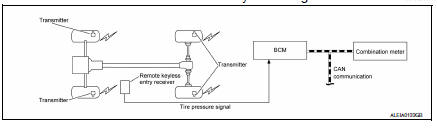
TIRE PRESSURE MONITORING SYSTEM : System Description
- The BCM has pressure judgment and trouble diagnosis functions. When the BCM detects low inflation pressure or another unusual symptom, the low tire pressure warning lamp in the combination meter is illuminated.
- If the tire pressure is less than the specified value, the low tire pressure warning lamp illuminates.
- The TPMS (Tire Pressure Monitoring System) is activated when vehicle speed is 40 km/h (25 MPH) or more.
INPUT/OUTPUT SIGNAL
| Component | Signal Description |
| BCM | Transmits the low tire pressure warning lamp signal via CAN communication to combination meter. |
| Combination meter | Transmits the vehicle speed signal via CAN communication to BCM. |
LOW TIRE PRESSURE WARNING LAMP CONTROL CONDITION
The BCM uses CAN communication to illuminate the low tire pressure warning lamp in the combination meter.
| Condition | Low tire pressure warning lamp |
| Ignition switch OFF | OFF |
| Ignition switch ON (system normal) | Warning light turns on for 1second, then turns off. |
| Low tire pressure | ON |
| Transmitter ID not registered in BCM. | |
| Tire pressure monitoring system malfunction | Warning light blinks 1 minute, then turns on. |
| Tire pressure sensor is in OFF state | Blink (Blinking pattern depends on the positions of nonoperational tire pressure sensors.) |
TIRE PRESSURE MONITORING SYSTEM : Easy Fill Tire Alert Function
NOTE:
When beginning tire inflation, it takes a few seconds for the Easy fill tire alert to function. If there is no response for approximately 15 seconds or more, cancel the Easy fill tire alert function and move the vehicle approximately 1 m (3.2 ft) backward or forward to try again.
- The Easy fill tire alert function operates only when the select lever position is in P-range with the ignition switch ON.
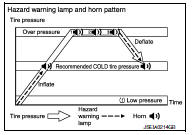
- This function informs the driver with a visual and audible indication that the recommended COLD tire pressure has been reached.
- The hazard warning lamps blink when the recommended COLD tire pressure has been reached. After the recommended COLD tire pressure has been reached, the horn sounds once and the hazard warning lamps stop blinking.
- If the tire pressure value is equal to or greater than 30 kPa (0.31 kg/cm2, 4 psi) more than the recommended COLD tire pressure, the hazard warning lamps flash and horn sounds three times.
- To return the tire to the recommended COLD tire pressure, deflate the tire until the horn sounds once and the hazard warning lamps stop blinking.
 Component parts
Component Parts Location
BCM (view with instrument panel removed)
Remote keyless entry receiver (view
with instrument panel removed)
Transmitter
Combination meter
Component Descript ...
 Diagnosis system (BCM) (with intelligent key system)
Common item
COMMON ITEM : CONSULT Function (BCM - COMMON ITEM)
APPLICATION ITEM
CONSULT performs the following functions via CAN communication with BCM.
Direct Diagnostic Mode
Descriptio ...
Other materials:
Washer motor circuit
Diagnosis Procedure
Regarding Wiring Diagram information, refer to WW-24, "Wiring Diagram - With
Intelligent Key" or WW-29,
"Wiring Diagram - Without Intelligent Key".
1. Check front washer motor fuse
Turn the ignition switch OFF.
Check that the following fuse is not b ...
Preparation
Special Service Tools
The actual shape of the tools may differ from those illustrated here.
Commercial Service Tools
...
Hazard warning flasher switch
Push the switch on to warn other drivers when
you must stop or park under emergency conditions.
All turn signal lights flash.
WARNING
If stopping for an emergency, be sure to
move the vehicle well off the road.
Do not use the hazard warning flashers
while moving on th ...
