
Nissan Sentra Owners Manual: Steering wheel switch for audio control (if so equipped)
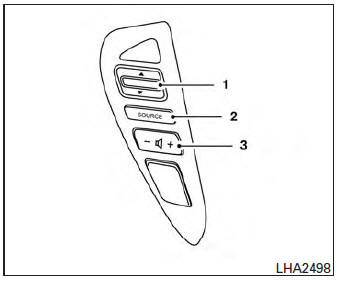
- Tuning switch
- Power on and SOURCE select switch
- Volume control button
The audio system can be operated using the controls on the steering wheel.
POWER on switch
With the ignition switch in the ACC or ON position, push the SOURCE switch to turn the audio system on.
SOURCE select switch
Push the source select switch to change the mode in the following sequence: AM → FM1 → FM2 → XM1 (satellite radio, if so equipped)→XM2 (satellite radio, if so equipped) →XM3 (satellite radio, if so equipped)→CD*→ USB/iPod®* (if so equipped)→Bluetooth® Audio* → AUX* → AM.
* These modes are only available when compatible media storage is inserted into the device or connected to the system.
Volume control switch
Push the volume control switch to increase or decrease the volume.
 Tuning switch
While the display is showing a map or audio screen, tilt the Tuning switch upward or downward to select a station, track, CD or folder. For most audio sources, tilting the switch up/down for more than 1.5 seconds provides a different function than a tilting up/down for less than 1.5 seconds.
AM and FM:
- Tilt up/down for less than 1.5 seconds to increase or decrease the preset station.
- Tilt up/down for more than 1.5 seconds to seek up or down to the next station.
XM/SXM (if so equipped):
- Tilt up/down for less than 1.5 seconds to increase or decrease the preset station.
- Tilt up/down for more than 1.5 seconds to go to the next or previous category.
iPod® (if so equipped):
- Tilt up/down for less than 1.5 seconds to increase or decrease the track number.
- Tilt up/down for more than 1.5 seconds to fast forward or rewind the current track.
CD:
- Tilt up/down for less than 1.5 seconds to increase or decrease the track number.
- Tilt up/down for more than 1.5 seconds to increase or decrease the folder number (if playing compressed audio files) or to fast forward or rewind the current track.
USB (if so equipped):
- Tilt up/down for less than 1.5 seconds to increase or decrease the track number.
- Tilt up/down for more than 1.5 seconds to fast forward or rewind the current track.
Bluetooth® Audio (if so equipped):
- Tilt up/down for less than 1.5 seconds to skip ahead or back to the next song.
- Tilt up/down for more than 1.5 seconds to reverse or fast forward the current track.
Pandora® Audio (if so equipped):
- Tilt up for less than 1.5 seconds to input “thumbs up� for the current song.
- Tilt down for less than 1.5 seconds to input “thumbs down� for the current song.
- Tilt up for more than 1.5 seconds to skip to the next song (if the maximum of six skips per station per hour has not been exceeded).
 CD care and cleaning
Handle a CD by its edges. Do not bend the
disc. Never touch the surface of the disc.
Always place the discs in the storage case
when they are not being used.
To clean a disc, wipe the ...
 Antenna
Window antenna
The antenna pattern is printed inside the rear
window.
CAUTION
Do not place metalized film near the
rear window glass or attach any metal
parts to it. This may cause poor rec ...
Other materials:
Precaution for supplemental restraint system (srs) "air bag" and "seat belt
pre-tensioner"
The Supplemental Restraint System such as “AIR BAG” and “SEAT BELT PRE-TENSIONER”,
used along
with a front seat belt, helps to reduce the risk or severity of injury to the
driver and front passenger for certain
types of collision. Information necessary to service the system ...
Fuses
Two types of fuses are used. Type A is used in
the fuse boxes in the engine compartment. Type
B is used in the passenger compartment fuse
box.
Type A fuses are provided as spare fuses. They
are stored in the passenger compartment fuse
box.
Type A fuses can be installed in the engine com ...
NISSAN vehicle immobilizer system
The NISSAN Vehicle Immobilizer system will not
allow the engine to start without the use of the
registered key.
If the engine fails to start using a registered key
(for example, when interference is caused by
another registered key, an automated toll road
device or automatic payment device o ...
