
Nissan Sentra Service Manual: Rear window defogger switch
Description
- The rear window defogger is operated by pressing the rear window defogger switch ON.
- The indicator lamp in the rear window defogger switch illuminates while the rear window defogger is on.
Component function check
1. Check rear window defogger switch function
- Check (“REAR DEF SW”) in BCM - REAR DEFOGGER “DATA MONITOR” mode by using CONSULT.
- Operate rear window defogger switch and check the status on consult screen.

Is the inspection result normal? Yes >> rear window defogger switch function is ok.
No >> refer to def-30, "diagnosis procedure".
Diagnosis procedure
Regarding wiring diagram information, refer to def-20, "wiring diagram".
1. Check rear window defogger on signal circuit
- Turn ignition switch to on.
- Turn rear window defogger switch ON.
- Check voltage between bcm connector and ground.

Is the inspection result normal? Yes >> replace bcm. Refer to bcs-73, "removal and installation" (with intelligent key system) or bcs- 126, "removal and installation" (without intelligent key system).
No >> go to 2.
2. Check harness continuity
- Turn ignition switch to off.
- Disconnect bcm and a/c auto amp.
- Check continuity between BCM connector and A/C auto amp.
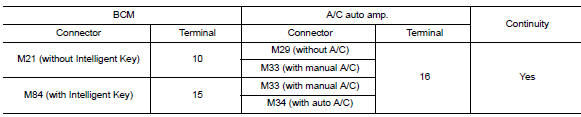
- Check continuity between bcm harness connector and ground.
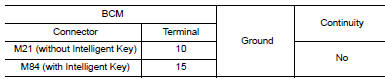
Is the inspection result normal? YES >> Replace A/C auto amp. Refer to HAC-105, "Removal and Installation" (with auto A/C) or HAC- 189, "Removal and Installation" (without auto A/C).
NO >> Repair or replace harness.

 Rear window defogger relay
Description
Power is supplied to the rear window defogger with BCM control.
Component Function Check
1. Check rear window defogger relay power supply circuit
Turn ignition switch ON.
Check ...
Other materials:
Troubleshooting guide
The system should respond correctly to all voice
commands without difficulty. If problems are encountered,
try the following solutions.
Where the solutions are listed by number, try
each solution in turn, starting with number 1, until
the problem is resolved.
Symptom
Solution
...
Rear seat belt
Exploded View - Seat Belt Retractor
Seat belt retractor (RH)
Seat belt retractor (center)
Seat belt retractor (LH)
Front
Removal and Installation - Seat Belt Retractor
REMOVAL
Remove the rear parcel shelf finisher. Refer to INT-33, "Removal and
Installation".
Re ...
Service Notice and Precautions for EPS System
Check the following item when performing the trouble
diagnosis.
Check any possible causes by interviewing the symptom and
it′s condition from the customer if any malfunction,
such as EPS warning lamp is turned ON, occurs.
Check if air pressure and size of tires are proper, t ...
