
Nissan Sentra Service Manual: Rear door finisher
Exploded View
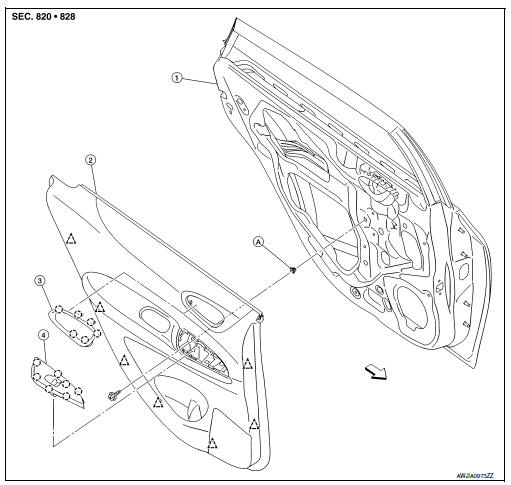
- Rear door panel
- Rear door finisher
- Inside door handle escutcheon
- Rear power window switch finisher
- Grommet
 Clip
Clip
 Pawl
Pawl
 Front
Front
Removal and Installation
CAUTION:
- When removing, always use a suitable tool that is made of plastic to prevent damage to the parts.
- Do not damage the door panel.
REMOVAL
- Remove inside door handle escutcheon.
- Apply protective tape (A) to protect the component from damage as shown.
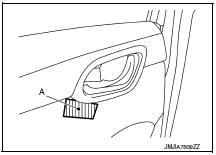
- Insert a suitable tool (A) as shown between inside door handle escutcheon and inside door handle.
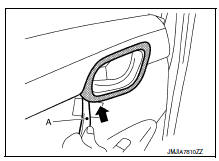
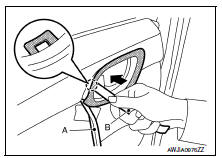
- With suitable tool (A) in position, insert a second suitable tool (B) as shown, then release pawl as shown.
 Pawl
Pawl
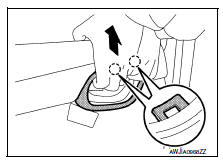
- Pull upward on the inside door handle escutcheon as shown to release the pawls on the upper portion of inside door handle escutcheon.
 Pawl
Pawl
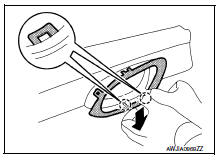
- Press down on the inside door handle escutcheon as shown to release the pawls on the lower portion of inside door handle escutcheon.
 Pawl
Pawl
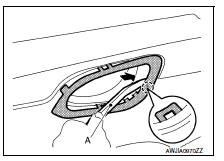
- Insert a suitable tool (A) as shown to release the remaining pawl and remove.
 Pawl
Pawl
- Remove rear power window switch finisher. Refer to PWC-72, "Removal and Installation".
- Remove rear door finisher.
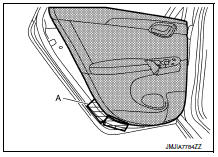
- Remove rear door finisher screw (A).
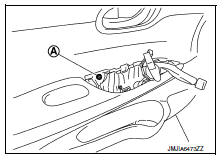
- Apply protective tape (A) to protect the component from damage as shown.
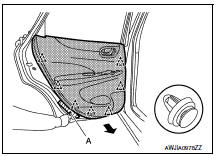
- Release rear door finisher clips using a suitable tool (A) as shown.
 Clip
Clip
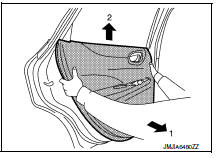
Remove rear door finisher as shown.
INSTALLATION
Installation is in the reverse order of removal.
CAUTION:
When installing, check that clips are accurately aligned with the holes on the door panel, then press in.
 Front door finisher
Exploded View
Front door panel
Front door finisher
Inside door handle escutcheon
Main power window and door lock/
unlock switch finisher
Door mirror corner finisher
Grommet
...
 Body side trim
Exploded View
Rear body side welt
Front body side welt
Tether clip
Front pillar finisher
Metal clip
Dash clip
Dash side finisher
Harness protector
Front kicking plate inner
C ...
Other materials:
Door locks/unlocks precaution
Do not push the door handle request switch
with the Intelligent Key held in your hand as
illustrated. The close distance to the door
handle will cause the Intelligent Key system
to have difficulty recognizing that the Intelligent
Key is outside the vehicle.
After locking with the ...
Tcm branch line circuit
Diagnosis procedure
1.Check connector
Turn the ignition switch off.
Disconnect the battery cable from the negative terminal.
Check the following terminals and connectors for damage, bend and loose
connection (unit side and connector
side).
Tcm
Harness connector f50
Harness co ...
Recommended fluids/lubricants and capacities
The following are approximate capacities. The actual refill capacities may
be slightly different. When refilling, follow the procedure
described in the “Maintenance and do-it-yourself� section to determine the
proper refill capacity.
...
