
Nissan Sentra Service Manual: Power window main switch
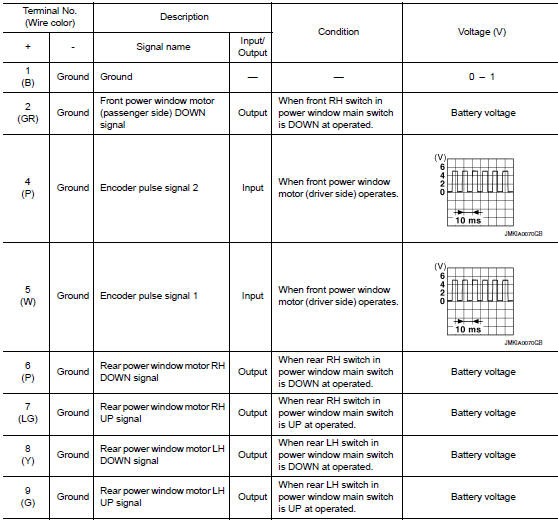
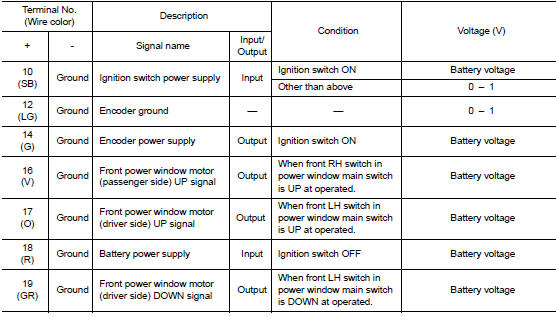
Reference Value
TERMINAL LAYOUT
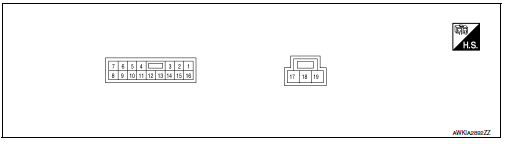
PHYSICAL VALUES
MAIN POWER WINDOW AND DOOR LOCK/UNLOCK SWITCH
Fail Safe
FAIL-SAFE CONTROL
Switches to fail-safe control when malfunction is detected in encoder signal that detects up/down speed and direction of door glass. Switches to fail-safe control when error beyond regulation value is detected between the fully closed position and the actual position of the glass.
| Error | Error condition |
| Pulse sensor malfunction | When only one side of pulse signal is being detected for more than the specified value. |
| Both pulse sensors malfunction | When both pulse signals have not been detected for more than the specified value during glass open/close operation. |
| Pulse direction malfunction | When the pulse signal that is detected during glass open/close operation detects the opposite condition of power window motor operating direction. |
| Glass recognition position malfunction 1 | When it detects the error between glass fully closed position in power window switch memory and actual fully closed position during glass open/close operation is more than the specified value. |
| Glass recognition position malfunction 2 | When it detects pulse count more than the value of glass full stroke during glass open/close operation. |
It changes to condition before initialization and the following functions do not operate when switched to failsafe control.
- Auto-up operation
- Anti-pinch function
Perform initial operation to recover when switched to fail-safe mode. However, it switches back to fail-safe control when malfunction is found in power window main switch or front power window motor (driver side).
 BCM(body control module)
List of ECU Reference
WITH INTELLIGENT KEY SYSTEM
WITHOUT INTELLIGENT KEY SYSTEM
...
 Wiring diagram
Power window system
Wiring Diagram
...
Other materials:
P1556, P1557 Battery temperature sensor
DTC Logic
DTC DETECTION LOGIC
NOTE:
If DTC P1556 or P1557 is displayed with DTC P0643, first perform the
trouble diagnosis for DTC P0643.
Refer to EC-353, "DTC Logic".
DTC No.
CONSULT screen terms
(Trouble diagnosis content)
DTC detecting condition
Possible caus ...
U1010 control unit (can)
Description
Initial diagnosis of combination meter.
Dtc logic
Dtc detection logic
Dtc
Display contents of consult
Detection condition
Possible malfunction
U1010
CONTROL UNIT (CAN)
[U1010]
When detecting error during the initial diagnosis of
the can controlle ...
On board diagnostic (OBD) system
Diagnosis Description
This system is an on board diagnostic system that records exhaust
emission-related diagnostic information
and detects a sensors/actuator-related malfunction. A malfunction is indicated
by the malfunction indicator
lamp (MIL) and stored in ECU memory as a DTC. The diagnos ...
