
Nissan Sentra Owners Manual: NISSAN Intelligent Key® Operation
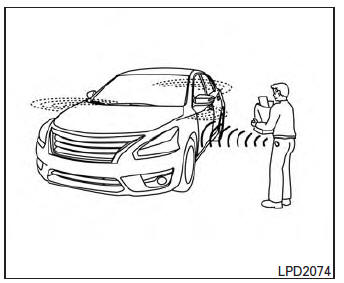
You can lock or unlock the doors without taking the Intelligent Key out of your pocket or bag.
When you carry the Intelligent Key with you, you can lock or unlock all doors by pushing the door handle request switch within the range of operation.
Locking doors
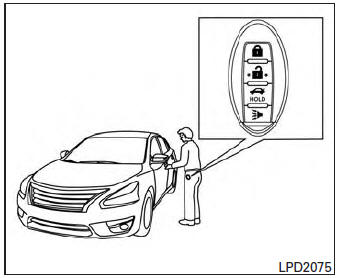
- Move the shift lever to the P (Park) position, place the ignition switch in the LOCK position and make sure you carry the Intelligent Key with you.
- Close all doors.
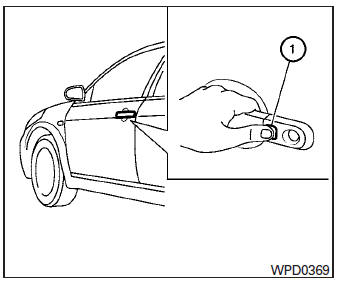
- Push any door handle request switch 1 while carrying the Intelligent Key with you.
- All doors and the trunk will lock.
- The hazard warning lights flash twice and the outside buzzer sounds twice.
NOTE:
- Doors lock with the door handle request switch while the ignition switch is not in the LOCK position.
- Doors do not lock by pushing the door handle request switch while any door is open. However, doors lock with the mechanical key even if any door is open.
- Doors do not lock with the door handle
request switch with the Intelligent Key inside
the vehicle and a beep sounds to warn you.
However, when an Intelligent Key is inside the vehicle, doors can be locked with another Intelligent Key.
CAUTION
- After locking the doors using the request switch, make sure that the doors have been securely locked by operating the door handle or the trunk opener switch.
- When locking the doors using the request switch, make sure to have the Intelligent Key in your possession before operating the request switch to prevent the Intelligent Key from being left in the vehicle.
- The request switch is operational only when the Intelligent Key has been detected by the Intelligent Key system.
Lockout protection
To prevent the Intelligent Key from being accidentally locked in the vehicle, lockout protection is equipped with the Intelligent Key.
When the driver’s side door is open, the doors are locked, and then the Intelligent Key is put inside the vehicle and all the doors are closed; the lock will automatically unlock and the door buzzer sounds.
NOTE:
The doors may not lock when the Intelligent Key is in the same hand that is operating the request switch to lock the door.
Put the Intelligent Key in a purse, pocket or your other hand.
CAUTION
The lockout protection may not function under the following conditions:
- When the Intelligent Key is placed on top of the instrument panel.
- When the Intelligent Key is placed on top of the rear parcel shelf.
- When the Intelligent Key is placed inside the glove box or a storage bin.
- When the Intelligent Key is placed inside the door pockets.
- When the Intelligent Key is placed on or under the spare tire area.
- When the Intelligent Key is placed inside or near metallic materials.
Unlocking doors
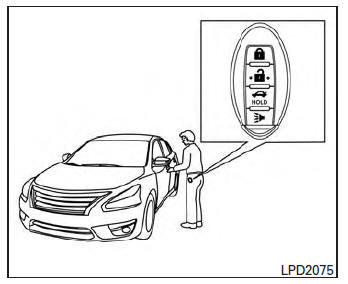
- Carry the Intelligent Key.
- Push the door handle request switch 1 .
- The hazard warning lights flash once and the outside buzzer sounds once.
- Push the door handle request switch 1 again within 60 seconds to unlock all doors.
If a door handle is pulled while unlocking the doors, that door may not be unlocked. Returning the door handle to its original position will unlock the door. If the door does not unlock after returning the door handle, push the door handle request switch to unlock the door.
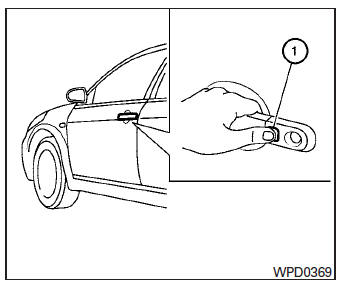
All doors will be locked automatically unless one of the following operations is performed within 1 minute after pushing the request switch.
- Opening any door.
- Pushing the ignition switch.
The interior light timer illuminates for a period of time when a door is unlocked and the room light switch is in the DOOR position.
The interior light can be turned off without waiting by performing one of the following operations.
- Placing the ignition switch in the ON position.
- Locking the doors with the remote controller.
- Switching the room light switch to the OFF position.
Opening the trunk lid
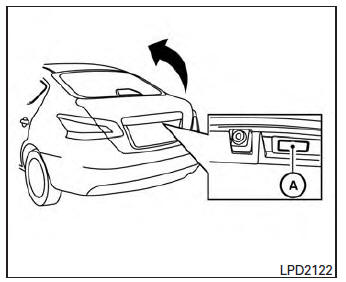
- Push the trunk opener request switch A for more than 1 second while carrying the Intelligent Key with you.
- The trunk will unlatch. A chime will sound 4 times.
- Raise the trunk lid to open the trunk.
Lockout protection
To prevent the Intelligent Key from being accidentally locked in the trunk, lockout protection is equipped with the Intelligent Key.
When all doors are locked and the trunk lid is closed with the Intelligent Key inside the trunk, the outside buzzer will sound and the trunk will open.
 Door locks/unlocks precaution
Do not push the door handle request switch
with the Intelligent Key held in your hand as
illustrated. The close distance to the door
handle will cause the Intelligent Key system
to have ...
 How to use the remote keyless entry function
The remote keyless entry function can operate all
door locks using the remote keyless function of
the Intelligent Key. The remote keyless function
can operate at a distance of 33 ft (10 m) away
fr ...
Other materials:
Parking brake system
Inspection and Adjustment
INSPECTION
Lever Stroke
Operate the parking brake lever with a force of 196 N (20.0
kg-f, 44.1 lb-f). Check that the lever stroke is
within the specified number of notches. (Check it by listening to the clicks
of the ratchet.)
Number of notches : Refer t ...
Application Download
Once connected, the NissanConnectâ„¢ App will
search your phone to determine which compatible
applications are currently installed. The user
will then choose which apps they want to bring
into their vehicle from the list of apps within the
“Manage My Apps� section of the NissanConnect
â„¢ ...
DTC/circuit diagnosis
P1610 LOCK MODE
Description
ECM forcibly switches to the mode that inhibits engine start, when engine
start operation is performed 5 times
or more while communication between ECM and BCM is not normal.
DTC Logic
DTC DETECTION LOGIC
NOTE:
If DTC P1610 is displayed with other DTC (for BCM or ...
