
Nissan Sentra Service Manual: Front combination lamp
Exploded view
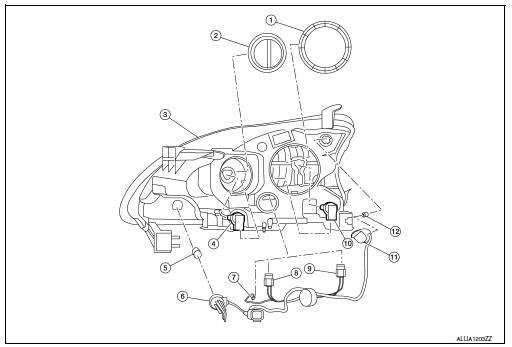
- Large cover (not serviceable)
- Small cover (not serviceable)
- Front combination lamp
- Halogen lamp bulb (high beam)
- Turn signal lamp bulb
- Turn signal lamp bulb socket
- LED harness connector
- Halogen lamp bulb (high beam) harness connector
- Halogen lamp bulb (low beam) harness connector
- Halogen lamp bulb (low beam)
- Side marker lamp bulb socket
- Side marker lamp bulb
Removal and installation
REMOVAL
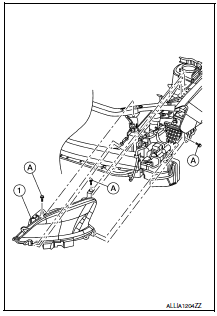
- Remove the front bumper fascia. Refer to EXT-17, "Removal and Installation".
- Remove the front combination lamp bolts (A).
- Pull the front combination lamp (1) forward.
- Disconnect the harness connectors from the front combination lamp (1).
INSTALLATION
Installation is in the reverse order of removal.
After installation, perform headlamp aiming adjustment. Refer to EXL-115, "Aiming Adjustment".
Bulb replacement
WARNING:
Do not touch bulb by hand while it is lit or right after being turned off. Burning may result.
CAUTION:
- Do not touch glass surface of the bulb with bare hands or allow oil or grease to get on it to prevent damage to bulb.
- Do not leave the bulb out of the lamp reflector for a long time
because dust, moisture, smoke, etc.
may affect the performance of the lamp.
HEADLAMP HIGH BEAM
Removal
- Remove the core support cover. Refer to EXT-23, "Exploded View".
- Rotate the plastic cover counterclockwise and remove.
- Rotate the headlamp high beam lamp counterclockwise and remove.
- Disconnect the harness connector from the headlamp high beam lamp.
Installation
Installation is in the reverse order of removal.
CAUTION:
After installing, be sure to install the cover securely to ensure watertightness.
HEADLAMP LOW BEAM
Removal
- Remove the core support cover. Refer to EXT-23, "Exploded View".
- Rotate the plastic cover counterclockwise and remove.
- Rotate the headlamp low beam sockets counterclockwise and remove.
- Disconnect the harness connector from the headlamp low beam lamp.
Installation
Installation is in the reverse order of removal.
CAUTION:
After installing, be sure to install the cover securely to ensure watertightness.
SIDE MARKER LAMP
Removal
- Remove the core support cover. Refer to EXT-23, "Exploded View".
- Rotate the side marker lamp bulb socket counterclockwise and remove.
- Remove the side marker bulb from the side marker bulb socket.
Installation
Installation is in the reverse order of removal.
CAUTION:
After installing, be sure to install the bulb socket securely to ensure watertightness.
TURN SIGNAL LAMP
Removal
- Remove the core support cover. Refer to EXT-23, "Exploded View".
- Rotate the turn signal lamp bulb socket counterclockwise and remove.
- Remove the turn signal bulb from the turn signal bulb socket.
Installation
Installation is in the reverse order of removal.
CAUTION:
After installing, be sure to install the bulb socket securely to ensure watertightness.
Park Lamp
The park lamp LED bulb is integrated into the front combination lamp and is serviced as an assembly. Refer to EXL-119, "Removal and Installation".

 Front fog lamp
Removal and Installation
FOG LAMP
Removal
Position the fender protector aside. Refer to EXT-28, "FENDER PROTECTOR
: Removal and Installation
- Front Fender Protector".
Disconnec ...
Other materials:
P0011 IVT control
DTC Logic
DTC DETECTION LOGIC
NOTE:
If DTC P0011 is displayed with DTC P0075, first perform the trouble
diagnosis for EC-180, "DTC Logic".
DTC No.
CONSULT screen terms
(Trouble diagnosis content)
DTC detecting condition
Possible cause
P0011
INT/V TIM CO ...
Wiring diagram
Ipdm e/r (intelligent power distribution module engine room)
Wiring diagram
...
Eps branch line circuit
Diagnosis procedure
1.Check connector
Turn the ignition switch off.
Disconnect the battery cable from the negative terminal.
Check the terminals and connectors of the eps control unit for damage,
bend and loose connection (unit
side and connector side).
Is the inspection result norm ...
