
Nissan Sentra Service Manual: ECU diagnosis information
EPS control unit
Reference Value
VALUES ON THE DIAGNOSIS TOOL
The following table includes information (items) inapplicable to this vehicle. For information (items) applicable to this vehicle, refer to CONSULT display items.
CAUTION:
The output signal indicates the EPS control unit calculation data. The normal values will be displayed even in the event that the output circuit (harness) is open.
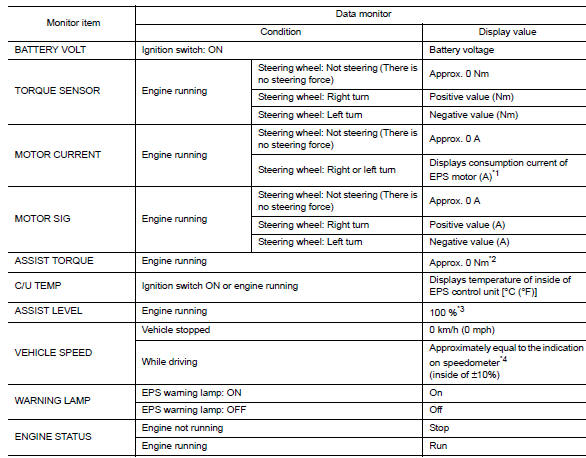
*1: Almost in accordance with the value of “MOTOR SIG”. It is not a malfunction though these values are not accorded when steering quickly.
*2: A fixed value is indicated regardless of steering turning.
*3: Normally displays 100%. In case of an excessive stationary steering, the assist curvature gradually falls.
However, it returns to 100% when left standing.
*4: It is not a malfunction, though it might not be corresponding just after ignition switch in turned ON.
Terminal layout
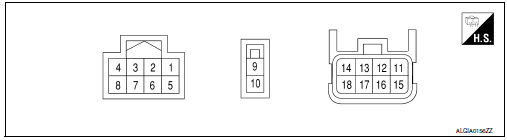
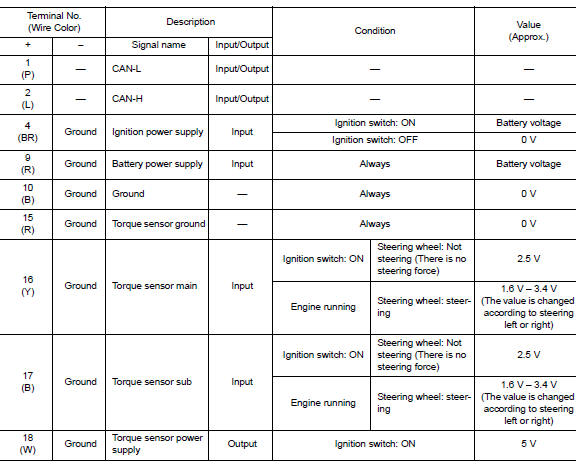
Physical values
Fail-Safe
-
If any malfunction occurs in the system and control unit detects the malfunction, eps warning lamp on combination meter turns on to indicate system malfunction.
-
When eps warning lamp is on, the system enters into a manual steering state. (Control turning force steering wheel becomes heavy.)
-
Under abnormal vehicle speed signal conditions, vehicle speed is judged as constant.
Protection Function
Eps control unit decreases the output signal to eps motor while extremely using the power steering function (e.G., Full steering) consecutively for protecting eps motor and eps control unit (overload protection control).
While activating overload protection control, the assist torque gradually decreases, and the steering wheel Turning force becomes heavy. The normal assist torque is recovered if the steering wheel is not turned for a while.
DTC Inspection Priority Chart
When multiple dtcs are detected simultaneously, check one by one depending on the following priority list.

DTC Index
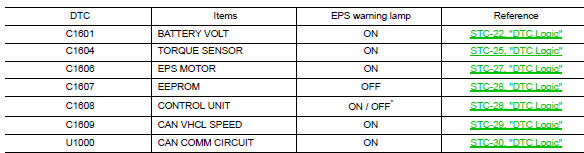
*: Even if dtc is detected, eps warning lamp does not turn on when assist torque is generated.
 Diagnosis system (EPS control unit)
CONSULT Function
FUNCTION
CONSULT can display each diagnostic item using the diagnostic
test modes shown following.
Diagnostic test mode
Function
ECU identification
The part ...
 Wiring diagram
Power steering control system
Wiring Diagram
...
Other materials:
Bluetooth® settings
To access the phone settings:
Press the [ ] button.
Touch the “Settings� key.
Touch the “Phone & Bluetooth� key.
Menu Item
Result
Phone Settings
See “Phone settings� in this section for more information.
Connect New Device
Touch to co ...
System
Tire pressure monitoring system
TIRE PRESSURE MONITORING SYSTEM : System Diagram
TIRE PRESSURE MONITORING SYSTEM : System Description
The BCM has pressure judgment and trouble diagnosis functions. When the
BCM detects low inflation pressure
or another unusual symptom, the low tire pr ...
Rear window defogger power supply and ground circuit
Description
Heats the heating wire with the power supply from the rear window defogger
relay to prevent the rear window
from fogging up.
Component function check
1. Check rear window defogger
Check that the heating wire of rear window defogger is heated when turning
the rear window defogge ...
