
Nissan Sentra Service Manual: Door switch
Component Function Check
1.Check function
- Select DOOR LOCK of BCM using CONSULT
- Select door sw-dr, door sw-as in data monitor mode
- Check that the function operates normally according to the following conditions.

Is the inspection result normal? YES >> Door switch is OK.
NO >> Refer to RF-26, "Diagnosis Procedure".
Diagnosis Procedure
Regarding wiring diagram information, refer to dlk-49, "wiring diagram".
1.Check door switch input signal
- Turn ignition switch off.
- Disconnect malfunctioning door switch connector.
- Check signal between malfunctioning door switch harness connector and ground using oscilloscope.
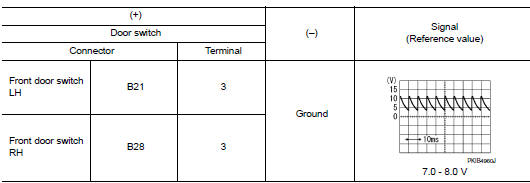
Is the inspection result normal? Yes >> go to 3.
No >> go to 2.
2.Check door switch circuit
- Disconnect BCM connector.
- Check continuity between door switch harness connector and bcm harness connector.

- Check continuity between door switch harness connector and ground.

Is the inspection result normal? Yes >> replace bcm. Refer to bcs-73, "removal and installation".
No >> repair or replace harness.
3.Check door switch
Refer to rf-27, "component inspection".
Is the inspection result normal? Yes >> go to 4.
No >> replace malfunctioning door switch.
4.Check intermittent incident
Refer to gi-39, "intermittent incident".
>> Inspection end.
Component Inspection
1.Check door switch
- Turn ignition switch off.
- Disconnect malfunctioning door switch connector.
- Check continuity between door switch terminals.
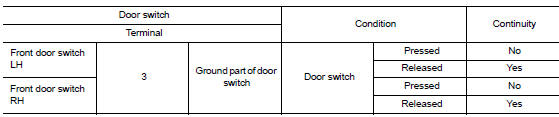
Is the inspection result normal? Yes >> inspection end.
No >> replace malfunction door switch.
 Moonroof switch
Description
Transmits switch operation signal to moonroof motor assembly.
Diagnosis Procedure
Regarding Wiring Diagram information, refer to RF-13, "Wiring Diagram".
1.Check moonroof sw ...

Other materials:
During a call
While a call is active, the following options are
available on the screen:
“Handset�
Select this option to switch control of the
phone call over to the handset.
“Mute Mic.�
Select this option to mute the microphone.
Select again to unmute the microphone.
Red phone ( ...
P060B ECM
DTC Logic
DTC DETECTION LOGIC
DTC No.
CONSULT screen terms
(Trouble diagnosis content)
DTC detecting condition
Possible cause
P060B
CONTROL MODULE
(Internal control module A/
D processing performance)
ECM internal analog/digital conversion processing
syst ...
Idle air volume learning
Description
Idle Air Volume Learning is a function of ECM to learn the idle air volume
that keeps each engine idle speed
within the specific range. It must be performed under any of the following
conditions:
Each time electric throttle control actuator or ECM is replaced.
Idle speed or i ...
