
Nissan Sentra Service Manual: Combination switch
Exploded view
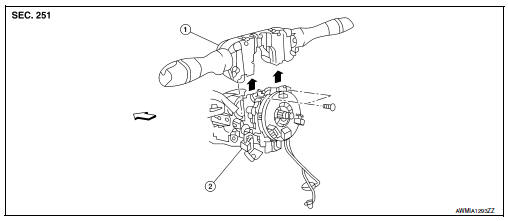
- Combination switch
- Combination switch harness connector
 Front
Front
NOTE:
Shown with the steering wheel removed for clarity only.
Removal and installation
REMOVAL
CAUTION:
- Before servicing, turn the ignition switch OFF, disconnect both battery terminals and wait at least three minutes.
- Do not use air or electric tools when removing or installing the combination switch.
- Disconnect both the negative and positive battery terminals, then wait at least three minutes. Refer to PG- 50, "Removal and Installation (Battery)".
- Remove the steering column covers. Refer to IP-16, "Removal and Installation".
- Rotate steering wheel clockwise to access first combination switch bolt and remove.
- Rotate steering wheel counter-clockwise to access second combination switch bolt and remove.
- Disconnect the harness connector from the combination switch and remove.
INSTALLATION
Installation is in the reverse order of removal.
CAUTION:
- After the work is completed, make sure no system malfunction is detected by air bag warning lamp.
- In case a malfunction is detected by the air bag warning lamp, reset with the self-diagnosis function and delete the memory with CONSULT.
- If a malfunction is still detected after the above operation,
perform self-diagnosis to repair malfunctions.
Refer to SRC-41, "ADDITIONAL SERVICE WHEN REPLACING CONTROL UNIT : Special Repair Requirement".
 Rear combination lamp
Exploded view
Rear combination lamp
Rear turn signal lamp bulb
Rear turn signal lamp socket
LED lamp harness connector
Rear combination lamp harness
connector
Back-up lamp bulb soc ...
 Hazard switch
Removal and Installation
REMOVAL
Remove cluster lid C (1). Refer to IP-20, "Removal and Installation
- Cluster Lid C".
Release pawls at ( ) and remove hazard switch (2).
INST ...
Other materials:
System
System Diagram
FRONT POWER WINDOW LH ANTI-PINCH SYSTEM
System Description
MAIN POWER WINDOW AND DOOR LOCK/UNLOCK SWITCH
INPUT/OUTPUT SIGNAL CHART
Item
Input signal to main power window and
door lock/unlock switch
Main power window and door
lock/unlock switch function
A ...
Eps warning lamp does not turn on
Description
EPS warning lamp does not turn ON when turning ignition switch
ON from OFF. (Check the illumination of the
EPS warning lamp.)
Diagnosis Procedure
1.CHECK EPS WARNING LAMP
Perform the trouble diagnosis of EPS warning lamp. Refer to
STC-31, "Diagnosis Procedure".
Is ...
Towing a trailer
Do not tow a trailer with your vehicle.
Flat towing
Towing your vehicle with all four wheels on the
ground is sometimes called flat towing. This
method is sometimes used when towing a vehicle
behind a recreational vehicle, such as a motor
home.
CAUTION
Failure to follow these guidelines c ...
