
Nissan Sentra Owners Manual: Bluetooth® streaming audio with Navigation System (if so equipped)
If you have a compatible Bluetooth® audio device that is capable of playing audio files, the device can be connected to the vehicle’s audio system so that the audio files on the device play through the vehicle’s speakers.
Connecting Bluetooth® audio
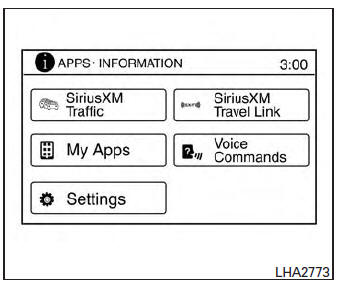
To connect your Bluetooth® audio device to the vehicle, follow the procedure below:
- Press the [
 ] button.
 - Touch the “Settings� key.
- Touch the “Phone & Bluetooth� key.
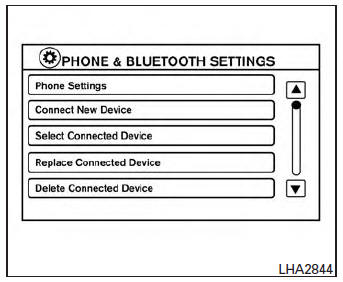
- Touch the “Connect New Device� key.
- The system acknowledges the command and asks you to initiate connecting from the phone handset. The connecting procedure of the cellular phone varies according to each cellular phone model. See the cellular phone Owner’s Manual for details. You can also visit www.nissanusa.com/bluetooth for instructions on connecting NISSAN recommended cellular phones.
Audio main operation
To switch to the Bluetooth® audio mode, press the AUX button repeatedly until the Bluetooth® audio mode is displayed on the screen.
The controls for the Bluetooth® audio are displayed on the screen.
 Bluetooth® streaming audio without Navigation System (if so equipped)
If you have a compatible Bluetooth® audio device
that is capable of playing audio files, the
device can be connected to the vehicle’s audio
system so that the audio files on the device play
thr ...
 Pandora® audio (if so equipped)
The vehicle’s audio system is capable of playing
audio streaming through a compatible, USBconnected
audio device using the Pandora® music
service.
Connecting a device for use with
Pandora® au ...
Other materials:
Automatic anti-glare rearview mirror (if so equipped)
The inside mirror is designed so that it automatically
dims according to the intensity of the headlights
of the vehicle following you. The automatic
anti-glare feature is activated when the ignition
switch is in the ON position.
NOTE:
Do not hang any objects over the sensors
1 or apply gl ...
System description
System
Can communication system
Can communication system : system description
CAN (Controller Area Network) is a serial communication line for real time
application. It is an on-vehicle multiplex
communication line with high data communication speed and excellent error
detection ability. Man ...
Moonroof switch
Removal and installation
REMOVAL
Remove the map lamp. Refer to INL-52, "Removal and Installation".
Release the pawls and remove the moonroof switch finisher (1).
: Pawl
Release the pawls and remove the moonroof switch (2).
: Pawl
INSTALLATION
Installation is in the ...
