
Nissan Sentra Owners Manual: Pandora® audio (if so equipped)
The vehicle’s audio system is capable of playing audio streaming through a compatible, USBconnected audio device using the Pandora® music service.
Connecting a device for use with Pandora® audio
Devices capable of streaming Pandora® audio can be connected to the vehicle’s audio system via the USB input jack. The USB input jack is located in the center console.
Launch the Pandora® application on the phone and then connect with the USB jack. Once connected, the Pandora® controls will be displayed on the control panel display screen.
Compatibility
The following iPhone® models are compatible with the system:
- iPhone® 3GS
- iPhone® 4
- iPhone® 4S
- iPhone® 5
The latest Pandora® application should be installed on the phone.
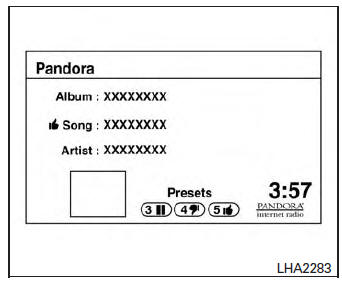
Models without Navigation System
Audio main operation
Models without Navigation System:
To switch to the Pandora® audio mode, press the AUX button repeatedly until the Pandora® audio mode is displayed on the screen.
The controls for the Pandora® audio mode are displayed on the screen. Press the audio preset 3 button to pause or play the music.
Press the audio preset 5 button to select “
 �
�
(thumbs up). Press the audio preset 4 button to
select “  � (thumbs down).
NOTE:
There is a limit of six skips per station per
hour. If a “ � (thumbs down)
is given
after the skip limit has been reached, the
current track will continue to play but the
feedback will be saved.
 Bluetooth® streaming audio with Navigation System (if so equipped)
If you have a compatible Bluetooth® audio device
that is capable of playing audio files, the
device can be connected to the vehicle’s audio
system so that the audio files on the device play
thr ...
 CD care and cleaning
Handle a CD by its edges. Do not bend the
disc. Never touch the surface of the disc.
Always place the discs in the storage case
when they are not being used.
To clean a disc, wipe the ...
Other materials:
Compressor
Exploded view
With air conditioning
Compressor
Front
Without air conditioning
A/c idler pulley
A/c idler pulley bracket
Compressor
Compressor : removal and installation
REMOVAL
Discharge the refrigerant. Refer to ha-23, "recycle refrigerant".
Remove the fr ...
P0705 Transmission range sensor A
DTC Logic
DTC DETECTION LOGIC
DTC
CONSULT screen terms
[Trouble diagnosis content]
DTC detection condition
Possible causes
P0705
T/M RANGE SENSOR A
[Transmission Range Sensor
A Circuit (PRNDL Input)]
Two or more range signals simultaneously
stay ON conti ...
Normal operating condition
Description
Symptom
Result
Slight vibrations are felt on the brake pedal and operation noises
occur when VDC, TCS or ABS is activated.
This is a normal condition
due to the VDC,
TCS or ABS activation.
Stopping distance is longer than that of vehicles without ...
