
Nissan Sentra Owners Manual: Bluetooth® Hands-Free Phone System with Navigation System (if so equipped)
WARNING
|
CAUTION
To avoid discharging the vehicle battery, use a phone after starting the engine.
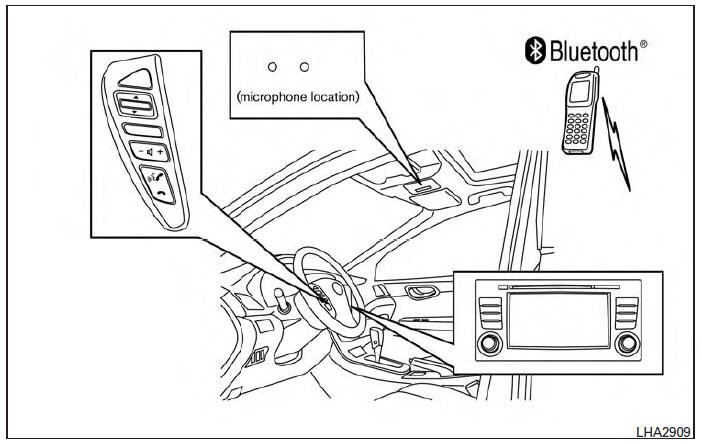
Your NISSAN is equipped with the Bluetooth® Hands-Free Phone System. If you have a compatible Bluetooth® enabled cellular phone, you can set up the wireless connection between your cellular phone and the in-vehicle phone module.
With Bluetooth® wireless technology, you can make or receive a hands-free telephone call with your cellular phone in the vehicle.
Once your cellular phone is connected to the in-vehicle phone module, no other phone connecting procedure is required. Your phone is automatically connected with the in-vehicle phone module when the ignition switch is placed in the ON position with the connected cellular phone turned on and carried in the vehicle.
You can register up to 5 different Bluetooth® cellular phones to the in-vehicle phone module.
However, you can talk on only one cellular phone at a time.
NISSAN Voice Recognition system supports the phone commands, so dialing a phone number using your voice is possible. For more details, see “NISSAN Voice Recognition System� in this section.
Before using the Bluetooth® Hands-Free Phone System, refer to the following notes.
- Set up the wireless connection between a cellular phone and the in-vehicle phone module before using the hands-free phone system.
- Some Bluetooth® enabled cellular phones may not be recognized by the in-vehicle phone module. Please visit www.nissanusa.com/bluetooth for a recommended phone list and connecting.
- You will not be able to use a hands-free phone under the following conditions:
- Your vehicle is outside of the cellular service area.
- Your vehicle is in an area where it is difficult to receive cellular signal; such as in a tunnel, in an underground parking garage, near a tall building or in a mountainous area.
- Your cellular phone is locked to prevent it from being dialed.
- When the radio wave condition is not ideal or ambient sound is too loud, it may be difficult to hear the other person’s voice during a call.
- Immediately after the ignition switch is placed in the ON position, it may be impossible to receive a call for a short period of time.
- Do not place the cellular phone in an area surrounded by metal or far away from the in-vehicle phone module to prevent tone quality degradation and wireless connection disruption.
- While a cellular phone is connected through the Bluetooth® wireless connection, the battery power of the cellular phone may discharge quicker than usual. The Bluetooth® Hands-Free Phone System cannot charge cellular phones.
- If the hands-free phone system seems to be malfunctioning, see “Troubleshooting guide� in this section. You can also visit www.nissanusa.com/bluetooth for troubleshooting help.
- Some cellular phones or other devices may cause interference or a buzzing noise to come from the audio system speakers. Storing the device in a different location may reduce or eliminate the noise.
- Refer to the cellular phone owner’s manual regarding the telephone charges, cellular phone antenna and body, etc.
- The signal strength display on the monitor will not coincide with the signal strength display of some cellular phones.
- Regulatory Information
- Voice commands
- Connecting Procedure
- Vehicle phonebook
- Making a call
- Receiving a call
- During a call
- Text messaging
- Bluetooth® settings
- Phone settings
 Manual control
While using the Voice Recognition system, it is
possible to select menu options by using the
steering wheel controls instead of speaking voice
commands. The manual control mode does not
allow dial ...
 Regulatory Information
FCC Regulatory information
CAUTION: To maintain compliance with
FCC’s RF exposure guidelines, use only the
supplied antenna. Unauthorized antenna,
modification, or attachments could damage ...
Other materials:
Rear air spoiler
Removal and installation
Rear air spoiler
High mounted stop lamp connector
(if equipped)
Trunk lid
Grommet
Nut
Front
Removal
Remove trunk lid finisher. Refer to INT-45, "Removal and Installation".
Disconnect the harness connector from the high mounted stop ...
Basic inspection
Diagnosis and repair workflow
Work Flow
OVERALL SEQUENCE
DETAILED FLOW
1. OBTAIN INFORMATION ABOUT SYMPTOM
Interview the customer to obtain as much information as possible about the
conditions and environment under
which the malfunction occurred.
>> GO TO 2.
2. CONFIRM THE SYMPTO ...
Positive crankcase ventilation
Inspection
1.CHECK PCV VALVE
With engine running at idle, remove PCV valve from rocker cover. A
properly working valve makes a hissing noise as air passes through
it. A strong vacuum should be felt immediately when a finger is
placed over valve inlet.
Is the inspection result normal?
YES &g ...
