
Nissan Sentra Owners Manual: Vehicle load capacity
Do not exceed the load limit of your vehicle shown as “The combined weight of occupants and cargo� on the Tire and Loading Information label. Do not exceed the number of occupants shown as “Seating Capacity� on the Tire and Loading Information label.
To get “the combined weight of occupants and cargo�, add the weight of all occupants, then add the total luggage weight. Examples are shown in the following illustration.
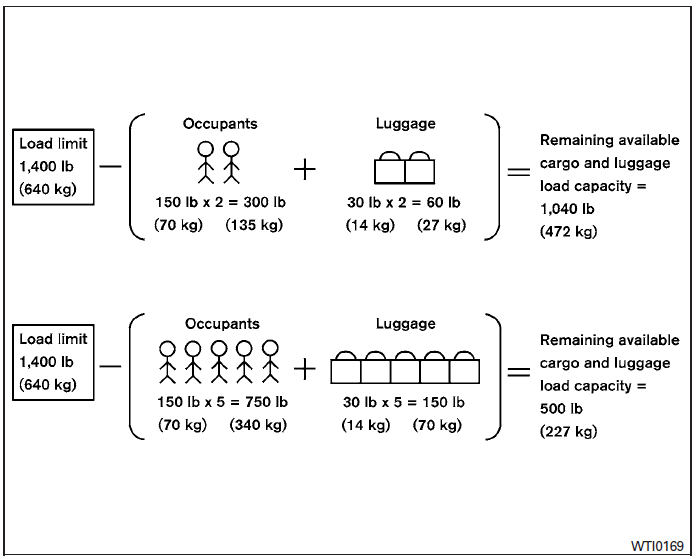
Example
Steps for determining correct load limit
- Locate the statement “The combined weight of occupants and cargo should never exceed XXX lbs or XXX kg� on your vehicle’s placard.
- Determine the combined weight of the driver and passengers that will be riding in your vehicle
- Subtract the combined weight of the driver and passengers from XXX lbs or XXX kg.
- The resulting figure equals the available amount of cargo and luggage load capacity. For example, if the XXX amount equals 1,400 lbs. and there will be five 150 lb. passengers in your vehicle, the amount of available cargo and luggage load capacity is 650 lbs. (1,400-750 (5 X 150) = 650 lbs) or (640-340 (5 X 70) = 300 kg.)
- Determine the combined weight of luggage and cargo being loaded on the vehicle. That weight may not safely exceed the available cargo and luggage load capacity calculated in Step 4.
- If your vehicle will be towing a trailer, load from your trailer will be transferred to your vehicle. Consult this manual to determine how this reduces the available cargo and luggage load capacity of your vehicle.
Before driving a loaded vehicle, confirm that you do not exceed the Gross Vehicle Weight Rating (GVWR) or the Gross Axle Weight Rating (GAWR) for your vehicle.
See “Measurement of weights� in this section.
Also check tires for proper inflation pressures.
See the Tire and Loading Information label.
 Terms
Terms
It is important to familiarize yourself with
the following terms before loading your
vehicle:
Curb Weight (actual weight of your
vehicle) - vehicle weight including:
standard and optional eq ...
 Loading tips
The GVW must not exceed GVWR
or GAWR as specified on the
F.M.V.S.S./C.M.V.S.S. certification
label.
Do not load the front and rear axle to
the GAWR. Doing so will exceed the
GVWR.
...
Other materials:
Precaution for Supplemental Restraint System (SRS) "AIR BAG" and "SEAT BELT
PRE-TENSIONER"
The Supplemental Restraint System such as “AIR BAG” and “SEAT BELT PRE-TENSIONER”,
used along
with a front seat belt, helps to reduce the risk or severity of injury to the
driver and front passenger for certain
types of collision. Information necessary to service the system ...
Diagnosis system [abs actuator and electric unit (control
unit)]
CONSULT Function (ABS)
FUNCTION
CONSULT can display each diagnostic item using the following
direct diagnostic modes.
Direct Diagnostic Mode
Description
ECU identification
The ABS actuator and electric unit (control unit) part number is
displayed.
Self Diagnos ...
Optical sensor
Description
The optical sensor measures ambient light and transmits the optical sensor
signal to the bcm.
Component function check
1.Check optical sensor signal by consult
Consult
Turn the ignition switch ON.
Select opti sen of bcm (head lamp) data monitor item.
Turn the lighting swit ...
