
Nissan Sentra Owners Manual: NISSAN Intelligent Key® battery discharge
Nissan Sentra Owners Manual / Starting and driving / Push-Button Ignition Switch (if so equipped) / NISSAN Intelligent Key® battery discharge
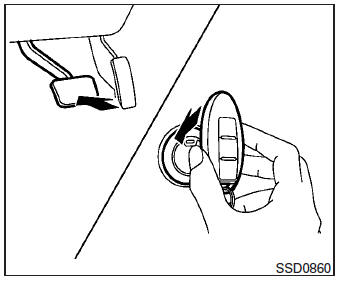
If the battery of the NISSAN Intelligent Key® is discharged, or environmental conditions interfere with the Intelligent Key operation, start the engine according to the following procedure:
- Place the shift lever in the P (Park) position.
- Firmly apply the foot brake.
- Touch the ignition switch with the Intelligent Key as illustrated. (A chime will sound.) After step 3 is performed, when the ignition switch is pushed without depressing the brake pedal, the ignition switch position will change to ACC.
- Push the ignition switch while depressing the brake pedal within 10 seconds after the chime sounds. The engine will start.
NOTE:
- When the ignition switch is pushed to the ACC or ON position or the engine is started by the above procedure, the Intelligent Key battery discharge indicator appears in the vehicle information display even when the Intelligent Key is inside the vehicle. This is not a malfunction. To turn off the Intelligent Key battery discharge indicator, touch the ignition switch with the Intelligent Key again.
- If the Intelligent Key battery discharge indicator appears, replace the battery as soon as possible. See “Battery Replacement� in the “Maintenance and do-it-yourself� section.
 Emergency engine shut off
To shut off the engine in an emergency situation
while driving, perform the following procedure:
Rapidly push the push-button ignition switch 3
consecutive times in less than 1.5 seconds, or
...
 NISSAN vehicle immobilizer system
The NISSAN Vehicle Immobilizer system will not
allow the engine to start without the use of the
registered key.
If the engine fails to start using a registered key
(for example, when interferenc ...
Other materials:
Front wheel hub and knuckle
Inspection
COMPONENT PART
Check that the mounting conditions (looseness, backlash) of each component
and component conditions
(wear, damage) are normal.
WHEEL HUB ASSEMBLY (BEARING-INTEGRATED TYPE)
Check the following items, and replace the part if necessary.
Move the wheel hub and bearin ...
Wiring diagram
Power distribution system
Wiring diagram
...
Service data and specifications (SDS)
General Specifications
Clutch Pedal
Clutch Disc
Clutch Cover
...
© 2014-2026 Copyright b17.nisentra.com
