
Nissan Sentra Owners Manual: Map lights
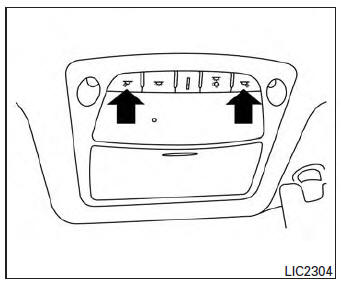
Push the button to turn the map lights on. To turn them off, press the button again.
CAUTION
Do not use for extended periods of time with the engine stopped. This could result in a discharged battery.
 Dome light
The interior light has a three-position switch and
operates regardless of ignition switch position.
When the switch is in the ON position 1 , the
interior lights illuminate, regardless of door ...
 Trunk light
The light illuminates when the trunk lid is opened.
When the trunk lid is closed, the light goes off.
The light will go off after a period of time if the
trunk lid is left open, unless the igni ...
Other materials:
EPS branch line circuit
Diagnosis procedure
1.Check connector
Turn the ignition switch off.
Disconnect the battery cable from the negative terminal.
Check the terminals and connectors of the EPS control unit for damage,
bend and loose connection (unit
side and connector side).
Is the inspection result norm ...
Variable voltage control system
CAUTION
Do not ground accessories directly to
the battery terminal. Doing so will bypass
the variable voltage control system
and the vehicle battery may not
charge completely.
Use electrical accessories with the engine
running to avoid discharging the
vehicle battery.
Your v ...
U1000 CAN Comm circuit
DTC Logic
DTC DETECTION LOGIC
DTC
Display Item
Malfunction detected condition
Possible causes
U1000
CAN COMM CIRCUIT
When CAN communication signal is not continuously
received for 2 seconds or more
CAN communication system malfunction
Diagnosis Procedure
...
