
Nissan Sentra Owners Manual: Locking with inside lock knob
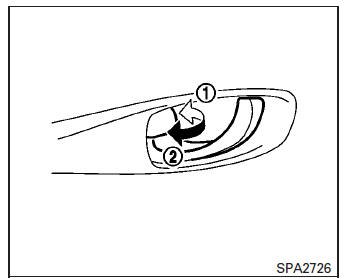
Inside lock
To lock the door without the key, move the inside lock knob to the lock position 1 , then close the door.
To unlock the door without the key, move the inside lock knob to the unlock position 2 .
 Locking with key
Driver’s side
The power door lock system allows you to lock or
unlock all doors at the same time.
Turning the key toward the front 1 of the vehicle
locks all doors.
Turning the key one ...
 Locking with power door lock switch
Door lock switch
To lock all the doors without a key, push the door
lock switch (driver’s or front passenger’s side) to
the lock position 1 . When locking the door this
way, be certain not ...
Other materials:
Anti-pinch system does not operate normally (driver side)
Diagnosis Procedure
1.CHECK POWER WINDOW AUTO OPERATION
Check AUTO operation when anti-pinch function does not operate.
Refer to PWC-67, "Diagnosis Procedure".
Is the inspection result normal?
YES >> INSPECTION END
NO >> GO TO 2.
2.REPLACE POWER WINDOW MAIN SWITCH
...
Power supply and ground circuit
Bcm (body control system) (with intelligent key system)
BCM (BODY CONTROL SYSTEM) (WITH INTELLIGENT KEY SYSTEM) : Diagnosis Procedure
Regarding Wiring Diagram information, refer to BCS-51, "Wiring Diagram".
1.CHECK FUSES AND FUSIBLE LINK
Check that the following fuses and fusible link ...
Strg branch line circuit
Diagnosis procedure
1.Check connector
Turn the ignition switch OFF.
Disconnect the battery cable from the negative terminal.
Check the terminals and connectors of the steering angle sensor for
damage, bend and loose connection
(unit side and connector side).
Is the inspection result ...
