
Nissan Sentra Service Manual: License plate lamp
Removal and Installation
REMOVAL
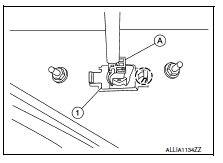
- Remove the license lamp finisher. Refer to EXT-44, "Removal and Installation".
- Disconnect the harness connector (A) from the license plate lamp (1).
- Release pawl and remove.
 : Pawl
INSTALLATION
Installation is in the reverse order of removal.
Bulb Replacement
WARNING:
Do not touch bulb while it is lit or right after being turned off. Burning may result.
CAUTION:
- Do not touch glass surface of the bulb with bare hands or allow oil or grease to get on it to prevent damage to bulb.
- Do not leave the bulb out of the lamp reflector for a long time
because dust, moisture, smoke, etc.
may affect the performance of the lamp.
REMOVAL
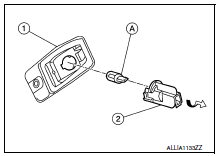
- Position trunk lid finisher aside. Refer to INT-45, "Removal and Installation".
- Rotate license plate lamp bulb socket (2) counterclockwise and remove from license plate lamp (1).
- Remove license plate lamp bulb (A) from license plate lamp bulb socket (2).
INSTALLATION
Installation is in the reverse order of removal.
 High-mounted stop lamp
Removal and Installation
HIGH-MOUNTED STOP LAMP - WITH REAR SPOILER
Removal
Remove the rear air spoiler. Refer to EXT-46, "Removal and
Installation".
Remove the screws and the h ...
 Rear combination lamp
Exploded view
Rear combination lamp
Rear turn signal lamp bulb
Rear turn signal lamp socket
LED lamp harness connector
Rear combination lamp harness
connector
Back-up lamp bulb soc ...
Other materials:
Power supply and ground circuit
BCM (BODY CONTROL SYSTEM) (WITH INTELLIGENT KEY SYSTEM)
BCM (BODY CONTROL SYSTEM) (WITH INTELLIGENT KEY SYSTEM) : Diagnosis Procedure
Regarding Wiring Diagram information, refer to BCS-51, "Wiring Diagram".
1.Check fuses and fusible link
Check that the following fuses and fusible link ...
Intake valve timing control
INTAKE VALVE TIMING CONTROL : System Description
SYSTEM DIAGRAM
INPUT/OUTPUT SIGNAL CHART
Sensor
Input signal to ECM
ECM function
Actuator
Crankshaft position sensor (POS)
Engine speed and piston position
Intake valve timing
control
Intake valve timing con ...
CD care and cleaning
Handle a CD by its edges. Do not bend the
disc. Never touch the surface of the disc.
Always place the discs in the storage case
when they are not being used.
To clean a disc, wipe the surface from the
center to the outer edge using a clean, soft
cloth. Do not wipe the disc using ...
