
Nissan Sentra Owners Manual: How to read the displayed lines
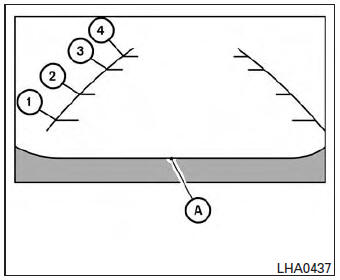
Guiding lines which indicate the vehicle width and distances to objects with reference to the vehicle body line A are displayed on the monitor.
Distance guide lines:
Indicate distances from the vehicle body.
- Red line 1 : approx. 1.5 ft (0.5 m)
- Yellow line 2 : approx. 3 ft (1 m)
- Green line 3 : approx. 7 ft (2 m)
- Green line 4 : approx. 10 ft (3 m)
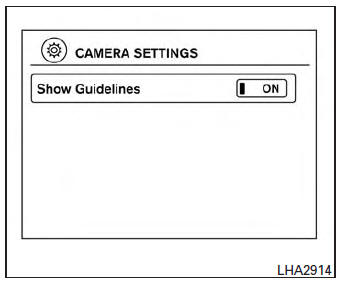
The on-screen guidelines can be set to on or off.
With the shift lever in the R (Reverse) position:
Press the CAMERA button to toggle the feature on and off.
With the shift lever in any position other than the R (Reverse) position:
- Press the CAMERA button.
- Touch the “Show Guidelines� key to toggle the feature on or off.
 RearView Monitor (if so equipped)
When the shift lever is shifted into the R (Reverse)
position, the monitor display shows the
view to the rear of the vehicle.
WARNINGFailure to follow the warnings and
instructions
fo ...
 Difference between predicted and actual distances
The distance guide line and the vehicle width
guide line should be used as a reference only
when the vehicle is on a level, paved surface. The
distance viewed on the monitor is for reference
only ...
Other materials:
Indicator lights
Continuously
Variable
Transmission (CVT) position
indicator light (if so equipped)
When the ignition switch is placed in the ON
position, this indicator light shows the transmission
shift lever position. See “Driving the vehicle�
in the “Starting and driving� section of this
manual ...
Warning lights
Anti-lock
Braking
System (ABS) warning light
When the ignition switch is placed in the ON
position, the Anti-lock Braking System (ABS)
warning light illuminates and then turns off. This
indicates the ABS is operational.
If the ABS warning light illuminates while the
engine is running or ...
Audible reminders
Brake pad wear warning
The disc brake pads have audible wear warnings.
When a disc brake pad requires replacement, it
makes a high pitched scraping sound when the
vehicle is in motion, whether or not the brake
pedal is depressed. Have the brakes checked as
soon as possible if the warning sou ...
