
Nissan Sentra Owners Manual: Control buttons
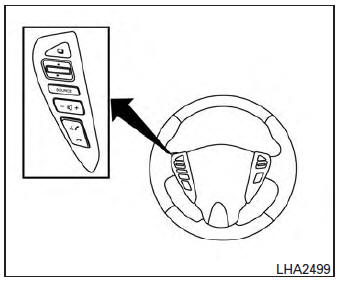
The control buttons for the Bluetooth® Hands- Free Phone System are located on the steering wheel.
 PHONE/SEND
Press the button to initiate
a VR session or answer an incoming
call.
You can also use the button to interrupt the system feedback and give a command at once. See “List of voice commands� and “During a call� in this section for more information.
 PHONE/END
While the voice recognition system
is active, press and hold
the button for 5 seconds to
quit the voice recognition system
at any time.
 Tuning switch
While using the voice recognition system, tilt the tuning switch up or down to manually control the phone system.
 Using the system
The NISSAN Voice Recognition system allows
hands-free operation of the Bluetooth® Phone
System.
If the vehicle is in motion, some commands may
not be available so full attention may be given to ...
 Connecting procedure
NOTE:
The connecting procedure must be performed
when the vehicle is stationary. If the
vehicle starts moving during the procedure,
the procedure will be cancelled.
To connect a phone to the ...
Other materials:
C1609 Vehicle speed signal
DTC Logic
Dtc detection logic
DTC
Display item
Malfunction detected condition
Possible cause
C1609
CAN VHCL SPEED
Malfunction is detected in vehicle speed signal that
is output from abs actuator and electric unit (control
unit) via can communication. ...
Diagnosis system (ipdm e/r) (with intelligent key system)
Diagnosis description
Auto active test
Description
In auto active test, the IPDM E/R sends a drive signal to the following
systems to check their operation.
Front wiper (lo, hi)
Parking lamp
License plate lamp
Tail lamp
Front fog lamp (if equipped)
Headlamp (LO, HI)
A/C compress ...
C1604 Torque sensor
DTC Logic
DTC DETECTION LOGIC
DTC
Display item
Malfunction detected condition
Possible cause
C1604
TORQUE SENSOR
When torque sensor output signal is malfunctioning
Harness or connector
Torque sensor
EPS control unit
DTC CONFIRMATION ...
