
Nissan Sentra Owners Manual: Hood
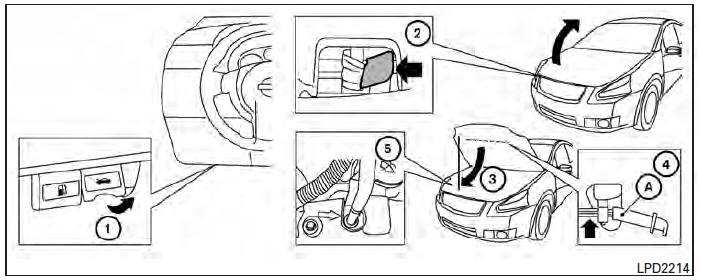
- Pull the hood lock release handle 1 located below the instrument panel until the hood springs up slightly.
- Locate the lever 2 in between the hood and grille and push the lever sideways with your fingertips.
- Raise the hood 3 .
- Remove the support rod 4 and insert it into the slot marked by an arrow 5 .
NOTE:
Do not place the support rod in a location other than the designated slot.
Hold the coated parts A when removing or resetting the support rod. Avoid direct contact with the metal parts, as they may be hot immediately after the engine has been stopped.
When closing the hood, return the support rod to its original position, lower the hood to approximately 12 in (30 cm) above the latch and release it. This allows proper engagement of the hood latch.
WARNING
|
 Troubleshooting guide
Symptom
Possible Cause
When pushing the ignition switch to stop
the engine
The P (Park) warning light in the instrument
panel illuminates and the inside chime
...
 Trunk lid
...
Other materials:
P0705 Transmission range sensor A
DTC Logic
DTC DETECTION LOGIC
DTC
CONSULT screen terms
[Trouble diagnosis content]
DTC detection condition
Possible causes
P0705
T/M RANGE SENSOR A
[Transmission Range Sensor
A Circuit (PRNDL Input)]
Two or more range signals simultaneously
stay ON conti ...
Periodic maintenance
ENGINE COOLANT
System Inspection
WARNING:
Do not remove the radiator cap when the engine is hot. Serious
burns could occur from high pressure
engine coolant escaping from the radiator.
Wrap a thick cloth around the cap. Slowly push down and turn it
a quarter turn to allow built-up pr ...
P0604 ECM
DTC Logic
DTC DETECTION LOGIC
DTC No.
CONSULT screen terms
(Trouble diagnosis content)
DTC detecting condition
Possible cause
P0604
ECM
[Internal control module
random access memory
(RAM) error]
Malfunction in the internal RAM of ECM.
ECM
DTC CON ...
