
Nissan Sentra Service Manual: Front combination lamp
Exploded View
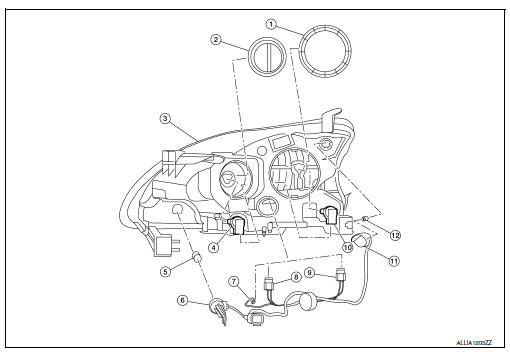
- Large cover (not serviceable)
- Small cover (not serviceable)
- Front combination lamp
- Halogen lamp bulb (high beam)
- Turn signal lamp bulb
- Turn signal lamp bulb socket
- LED harness connector
- Halogen lamp bulb (high beam) harness connector
- Halogen lamp bulb (low beam) harness connector
- Halogen lamp bulb (low beam)
- Side marker lamp bulb socket
- Side marker lamp bulb
Disassembly and Assembly
DISSASSEMBLY
WARNING:
Do not touch bulb while it is lit or right after being turned off. Burning may result.
CAUTION:
- Do not touch glass surface of the bulb with bare hands or allow oil or grease to get on it to prevent damage to bulb.
- Do not leave the bulb out of the lamp reflector for a long time
because dust, moisture, smoke, etc.
may affect the performance of the lamp.
- Remove front combination lamp. Refer to EXL-119, "Removal and Installation".
- Rotate the covers counterclockwise and remove.
- Rotate the halogen lamp bulb (low beam) counterclockwise and remove.
- Disconnect the harness connector from the halogen lamp bulb (low beam) and remove.
- Rotate the halogen lamp bulb (high beam) counterclockwise and remove.
- Disconnect the harness connector from the halogen lamp bulb (high beam) and remove.
- Rotate the side marker bulb socket counterclockwise and remove.
- Remove the side marker bulb from the side marker bulb socket.
- Rotate the turn signal bulb socket counterclockwise and remove.
- Remove the turn signal bulb from the turn signal bulb socket.
- Disconnect the harness connector from the LED circuit board and remove the harness.
ASSEMBLY
Assembly is in the reverse order of disassembly.
CAUTION:
After installing, be sure to install the bulb sockets securely to ensure watertightness.
Revision:

 Rear combination lamp
Exploded View
Rear combination lamp
Rear turn signal lamp bulb
Rear turn signal lamp socket
LED lamp harness connector
Rear combination lamp harness
connector
Back-up lamp bulb s ...
Other materials:
Abs actuator and electric unit (control unit)
Exploded View
ABS actuator and electric unit (control
unit)
ABS actuator and electric unit (control
unit) harness connector
Bushing
Bracket
To master cylinder secondary side
To master cylinder primary side
To rear LH caliper
To front RH caliper
...
Precaution for Supplemental Restraint System (SRS) "AIR BAG" and "SEAT BELT
PRE-TENSIONER"
The Supplemental Restraint System such as “AIR BAG” and “SEAT BELT PRE-TENSIONER”,
used along
with a front seat belt, helps to reduce the risk or severity of injury to the
driver and front passenger for certain
types of collision. Information necessary to service the system ...
Overdrive control switch
Component Function Check
1.CHECK SPORT INDICATOR LAMP FUNCTION
Check OD OFF indicator lamp turns ON for approx. 2 seconds when ignition
switch turns ON.
Is the inspection result normal?
YES >> GO TO 2.
NO >> Go to TM-239, "Diagnosis Procedure".
2.CHECK SPORT MODE SW ...
