
Nissan Sentra Owners Manual: Exterior and interior lights
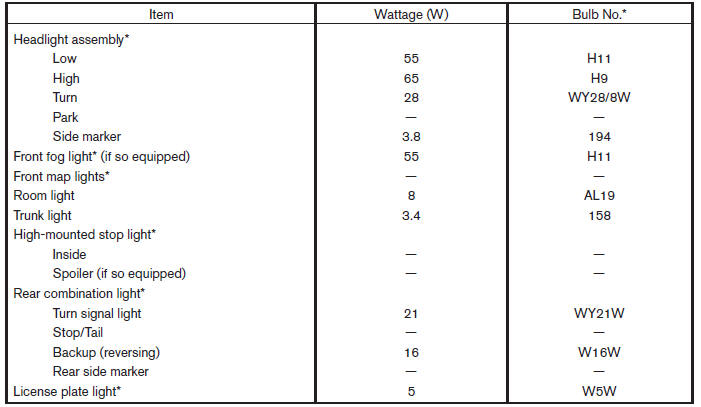
* Always check with the Parts Department at a NISSAN dealer for the latest parts information.
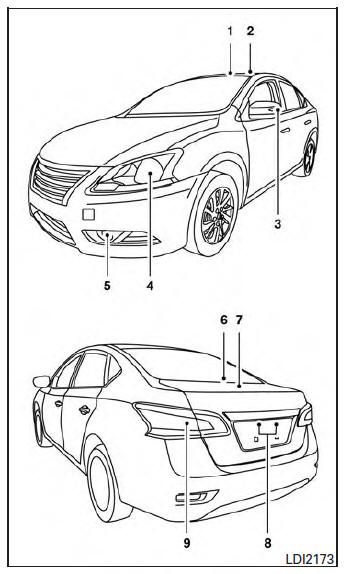
- Map light
- Interior light
- Door mirror turn signal light
- Headlight assembly
- Fog light (if so equipped)
- High-mount stop light
- Trunk light
- License plate light
- Rear combination light
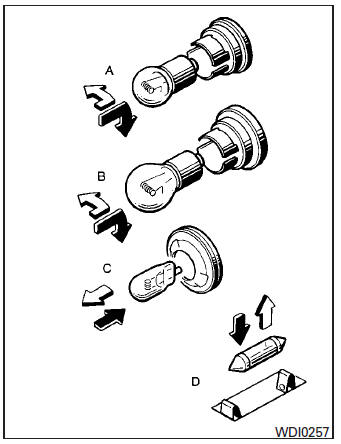
 Indicates bulb removal
 Indicates bulb replacement
Replacement procedures
All other lights are either type A, B, C or D. When replacing a bulb, first remove the lens and/or cover.
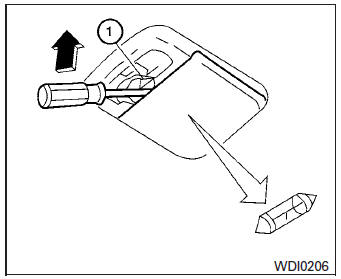
Interior light
Use a cloth 1 to protect the interior light housing.
 Fog lights (if so equipped)
Replacing the fog light bulb
Disconnect the negative battery cable.
Remove the fasteners A ; carefully pull back
the front fender protector .
Rotate the bulb B counterclockwise and
pul ...
 Wheels and tires
If you have a flat tire, see “Flat tire� in the
“In case of emergency� section of this
manual. ...
Other materials:
6M/T
6M/T : Exploded View (LH)
Circular clip
Dust shield
Slide joint housing
Snap ring
Spider assembly
Boot band
Boot
Shaft
Damper band
Dynamic damper
Circular clip
Joint sub-assembly
Wheel side
6M/T : Disassembly and Assembly (LH)
DISASSEMBLY (WHEEL SIDE)
CAUTION:
...
Jump starting
To start your engine with a booster battery, the
instructions and precautions below must be followed.
WARNING
If done incorrectly, jump starting can
lead to a battery explosion, resulting in
severe injury or death. It could also
damage your vehicle.
Explosive hydrogen ga ...
System description
Component parts
Component parts location
Front tweeter lh
GPS antenna
Steering switches
Av control unit
Front tweeter rh
Microphone
Front door speaker LH
Front door speaker rh
Rear speaker RH
Rear speaker lh
Antenna amp.
Satellite antenna
Rear view camera
Window a ...
