
Nissan Sentra Service Manual: Diagnosis system (ipdm e/r) (without intelligent key system)
Diagnosis Description
AUTO ACTIVE TEST
Description
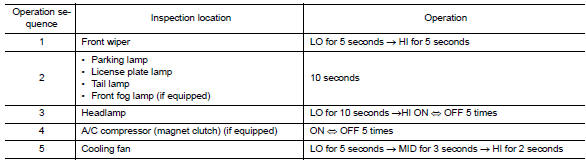
In auto active test, the IPDM E/R sends a drive signal to the following systems to check their operation.
- Front wiper (LO, HI)
- Parking lamp
- License plate lamp
- Tail lamp
- Front fog lamp (if equipped)
- Headlamp (LO, HI)
- A/C compressor (magnet clutch) (if equipped)
- Cooling fan
Operation Procedure
NOTE:
Never perform auto active test in the following conditions.
- Passenger door is open
- CONSULT is connected
- Close the hood and lift the wiper arms from the windshield. (Prevent windshield damage due to wiper operation)
NOTE:
When auto active test is performed with hood opened, sprinkle water on windshield beforehand.
- Turn the ignition switch OFF.
- Turn the ignition switch ON, and within 20 seconds, press the driver door switch 10 times. Then turn the ignition switch OFF.
- Turn the ignition switch ON within 10 seconds. After that the horn sounds once and the auto active test starts.
- After a series of the following operations is repeated 3 times, auto active test is completed.
NOTE:
- When auto active test has to be cancelled halfway through test, turn the ignition switch OFF.
- When auto active test is not activated, door switch may be the cause. Check door switch. Refer to DLK-255, "Component Inspection".
Inspection in Auto Active Test
When auto active test is actuated, the following operation sequence is repeated 3 times.
Concept of Auto Active Test
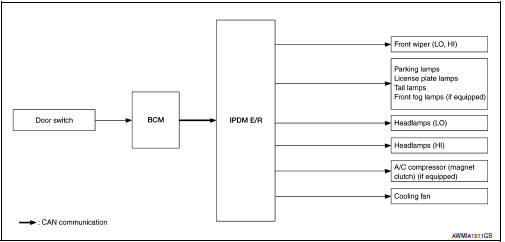
- IPDM E/R starts the auto active test with the door switch signals
transmitted by BCM via CAN communication.
Therefore, the CAN communication line between IPDM E/R and BCM is considered normal if the auto active test starts successfully.
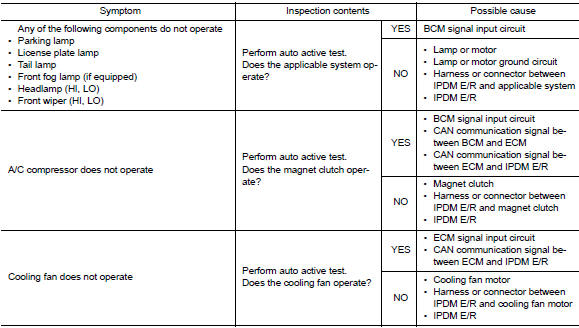
- The auto active test facilitates troubleshooting if any systems controlled by IPDM E/R cannot be operated.
Diagnosis Chart in Auto Active Test
CONSULT Function (IPDM E/R)
APPLICATION ITEM
CONSULT performs the following functions via CAN communication with IPDM E/R.
| Direct Diagnostic Mode | Description |
| Ecu Identification | The IPDM E/R part number is displayed. |
| Self Diagnostic Result | The IPDM E/R self diagnostic results are displayed. |
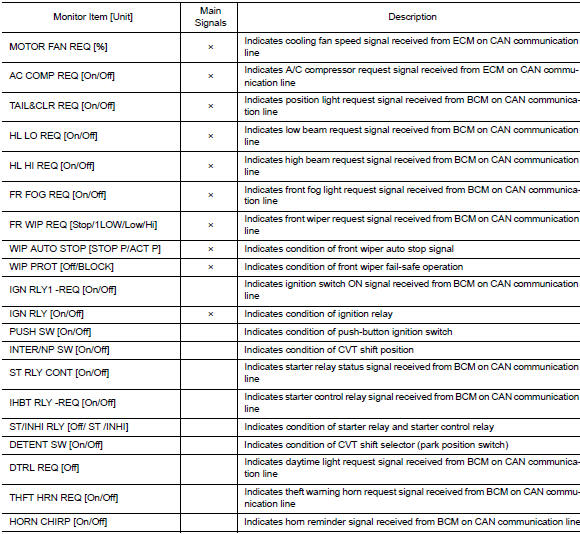
| Data Monitor | The IPDM E/R input/output data is displayed in real time. |
| Active Test | The IPDM E/R activates outputs to test components. |
| CAN Diag Support Mntr | The result of transmit/receive diagnosis of CAN communication is displayed. |
ECU IDENTIFICATION
The IPDM E/R part number is displayed.
SELF DIAGNOSTIC RESULT
Refer to PCS-48, "DTC Index".
DATA MONITOR
ACTIVE TEST


CAN DIAG SUPPORT MNTR
Refer to LAN-13, "CAN Diagnostic Support Monitor".
 Diagnosis system (ipdm e/r) (with intelligent key system)
Diagnosis description
Auto active test
Description
In auto active test, the IPDM E/R sends a drive signal to the following
systems to check their operation.
Front wiper (lo, hi)
Parking lam ...
 Ecu diagnosis information
BCM, IPDM E/R
List of ECU Reference
...
Other materials:
Front drive shaft boot
Exploded View
(LH)
Circular clip
Dust shield
Slide joint housing
Snap ring
Spider assembly
Boot band
Boot
Shaft
Damper band
Dynamic damper
Circular clip
Joint sub-assembly
Wheel side
(RH) 6M/T
Joint sub-assembly
Circular clip
Boot band
Boot
Shaft
Dam ...
Multiport fuel injection system
MULTIPORT FUEL INJECTION SYSTEM : System
Description
SYSTEM DIAGRAM
*1: ECM determines the start signal status by the signals of engine speed and
battery voltage.
*2: M/T models
*3: CVT models
*4: This sensor is not used to control the engine system under normal
conditions.
SYSTEM DES ...
Operating tips
CAUTION
Do not use alcohol, benzine or thinner
to clean the camera. This will cause
discoloration. To clean the camera,
wipe with a cloth dampened with a diluted
mild cleaning agent and then wipe
with a dry cloth.
Do not damage the camera as the monitor
screen may be adversely affe ...
