
Nissan Sentra Service Manual: Diagnosis system (bcm) (without intelligent key system)
Common item
Common item : consult function (bcm - common item)
APPLICATION ITEM
CONSULT performs the following functions via CAN communication with BCM.
| Direct Diagnostic Mode | Description |
| ECU identification | The BCM part number is displayed. |
| Self Diagnostic Result | The BCM self diagnostic results are displayed. |
| Data Monitor | The BCM input/output data is displayed in real time. |
| Active Test | The BCM activates outputs to test components. |
| Work support | The settings for BCM functions can be changed. |
| Configuration |
|
| CAN DIAG SUPPORT MNTR | The result of transmit/receive diagnosis of CAN communication is displayed. |
SYSTEM APPLICATION
BCM can perform the following functions.
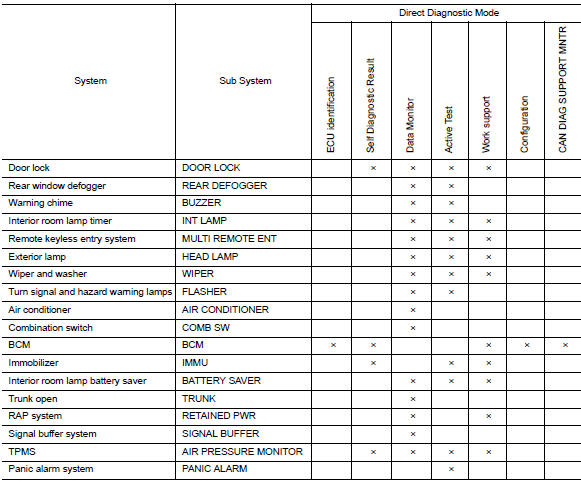
Buzzer
BUZZER : CONSULT Function (BCM - BUZZER)
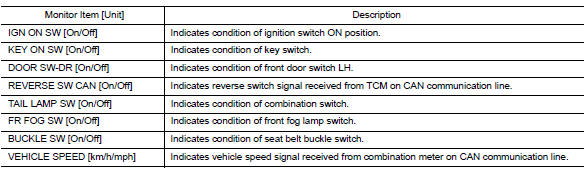
DATA MONITOR
ACTIVE TEST

 Diagnosis system (bcm) (with intelligent
key system)
Diagnosis system (bcm) (with intelligent
key system)
Common item
Common item : consult function (bcm -
common item)
APPLICATION ITEM
CONSULT performs the following functions via CAN communication with BCM.
Direct Diagnostic Mode
Descripti ...
 Ecu diagnosis information
Bcm, combination meter
List of ecu reference
...
Other materials:
Tow Truck Towing
NISSAN recommends that vehicle be towed with driving (front) wheels off the
ground or that a dolly be used.
CVT: Continuously Variable Transmission
M/T: Manual transmission
CAUTION:
All applicable state or Provincial laws and local laws regarding
the towing operation must be ...
Low tire pressure warning lamp blinks
Diagnosis Procedure
NOTE:
If low tire pressure warning lamp repeats blinking ON for 2 seconds and
OFF for 0.2 seconds, wake-up operation
for all transmitters is not complete.
Carry out transmitter wake-up operation. Refer to WT-22, "Work Procedure".
1.CHECK BCM CONNECTOR
Turn ...
Periodic maintenance
M/T OIL
Inspection
OIL LEAKAGE
Make sure that gear oil is not leaking from transaxle or around it.
OIL LEVEL
Remove filler plug (1) and gasket from transaxle case.
Check the oil level from filler plug mounting hole as shown.
CAUTION:
Do not start engine while checking oil level.
Se ...
