
Nissan Sentra Service Manual: Diagnosis and repair workflow
Work flow
Overall sequence
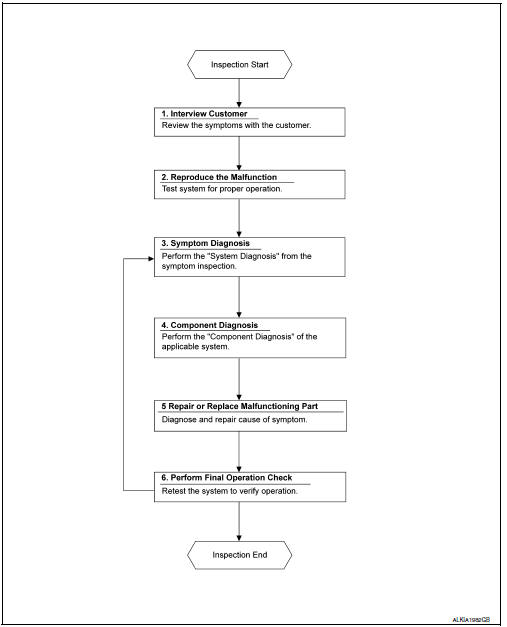
Detailed flow
1. Obtain information about symptom
Interview the customer to obtain as much information as possible about the conditions and environment under which the malfunction occurred.
>> GO TO 2.
2. Confirm concern
Check the malfunction on the vehicle that the customer describes.
Inspect the relation of the symptoms and the condition when the symptoms occur.
>> Go to 3.
3. Identify the malfunctioning system with symptom diagnosis
Use Symptom diagnosis from the symptom inspection result in step 2 and then identify where to start performing the diagnosis based on possible causes and symptoms.
>> GO TO 4.
4. Perform the component diagnosis of the applicable system
Perform the diagnosis with Component diagnosis of the applicable system.
>> GO TO 5.
5. Repair or replace the malfunctioning parts
Repair or replace the specified malfunctioning parts.
>> Go to 6.
6. Final check
Check that malfunctions are not reproduced when obtaining the malfunction information from the customer, referring to the symptom inspection result in step 2.
Are the malfunctions corrected? Yes >> inspection end.
No >> go to 3.
 Basic inspection
...
 Inspection and adjustment
Additional service when replacing control unit
Additional service when replacing control unit : description
Memory reset procedure
Please observe the following instructions at confirming the moo ...
Other materials:
CD care and cleaning
Handle a CD by its edges. Do not bend the
disc. Never touch the surface of the disc.
Always place the discs in the storage case
when they are not being used.
To clean a disc, wipe the surface from the
center to the outer edge using a clean, soft
cloth. Do not wipe the disc using ...
System description
Component parts
Component parts location
Ipdm e/r
System
Relay control system
Relay control system : system diagram
Relay control system : system description
Description
IPDM E/R activates the internal control circuit to perform the relay ON-OFF
control according to the input ...
P1148 Closed loop control
DTC Logic
DTC DETECTION LOGIC
NOTE:
DTC P1148 is displayed with DTC for A/F sensor 1.
When the DTC is detected, perform the trouble diagnosis of DTC corresponding to
A/F sensor 1.
DTC No.
CONSULT screen terms
(Trouble diagnosis content)
DTC detecting condition
Possible ca ...
