
Nissan Sentra Owners Manual: Connecting procedure
NOTE:
The connecting procedure must be performed when the vehicle is stationary. If the vehicle starts moving during the procedure, the procedure will be cancelled.
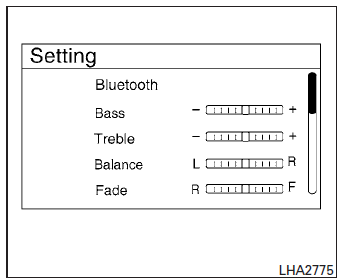
To connect a phone to the Bluetooth® Hands- Free Phone System:
- Press the SETTING button.
- Use the TUNE/FOLDER knob to select “Bluetooth� and then press the ENTER button.
| Menu Item | Result | |
| Bluetooth ON/OFF | Allows user to switch Bluetooth on and off. Bluetooth must be turned on in order to connect device. | |
| On | Turns Bluetooth functionality on | |
| Off | Turns Bluetooth functionality off | |
| Add Phone or Device | Upon pressing this button, a message with a PIN appears on the screen. operate the Bluetooth phone to enter the PIN and complete the connection process. | |
| Replace Phone | Replace the phone currently connected to the system. This option allows the user to keep any voicetags that were recorded using the previous phone if vehicle is equipped with voice recognition. | |
The connecting procedure varies according to each phone. See the phone’s Owner’s Manual for details. You can also visit www.nissanusa.com/bluetooth or call the NISSAN Consumer Affairs Department for instructions on connecting recommended cellular phones.
 Control buttons
The control buttons for the Bluetooth® Hands-
Free Phone System are located on the steering
wheel.
PHONE/SEND
Press the button to initiate
a VR session or answer an incoming
call.
You ca ...
 Voice commands
Voice commands can be used to operate the
Bluetooth® Hands-Free Phone System. Press
the button and say “Phone� to bring
up the
phone command menu. The available options
are:
Call
Pho ...
Other materials:
Heater operation
This mode is used to direct heated air to the foot
outlets. Some air also flows from the defrost
outlets and the side vent outlets.
Press the button to the OFF
position
for normal heating.
Press the air flow control
button.
Turn the fan control dial to the desired position.
Tur ...
Engine block heater (if so equipped)
Engine block heaters are used to assist with cold
temperature starting.
The engine block heater should be used when
the outside temperature is 20°F (-7°C) or lower.
WARNING
Do not use your engine block heater
with an ungrounded electrical system or
a 2-pronged adapter. You ...
Precaution
Precaution for Supplemental Restraint System (SRS) "AIR BAG" and "SEAT BELT
PRE-TENSIONER"
The supplemental restraint system such as “air bag” and “seat belt pre-tensioner”,
used along
with a front seat belt, helps to reduce the risk or severity of injur ...
