
Nissan Sentra Service Manual: Center console assembly
Exploded View
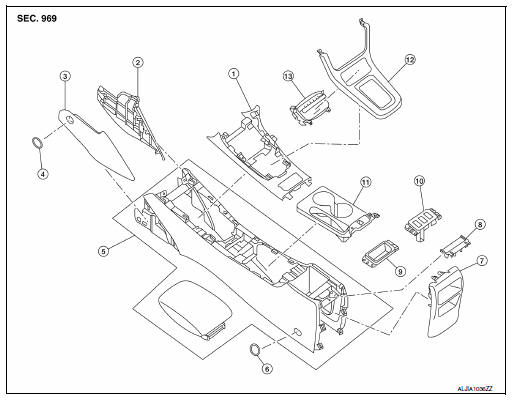
- Center console upper finisher
- Center console side finisher (RH)
- Center console side finisher (LH)
- Center console side finisher screw cover (LH/ RH)
- Center console assembly
- Center console screw cover (LH/ RH)
- Center console rear finisher
- Center console rear finisher cover
- Center console coin tray (if equipped)
- Heated seat switch finisher (if equipped)
- Center console cup holder finisher
- Shift selector finisher
- Storage bin
Removal and Installation
REMOVAL
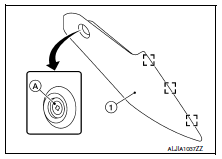
- Remove the center console side finishers (1) (LH/RH).
- Remove the center console side finisher screw (A) (LH/RH).
- Release the clips using a suitable tool, then remove the center console side finisher.
 Metal clip
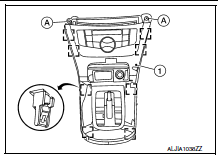
- Remove the shift selector finisher (1).
- Remove cluster lid C lower. Refer to IP-20, "Removal and Installation - Cluster Lid C Lower".
- Remove the shift selector screws (A).
- Release the clips using a suitable tool, then remove the shift selector finisher.
 Metal clip
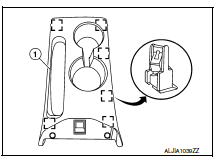
- Release the center console cup holder finisher clips, then remove the center console cup holder finisher (1).
 Metal clip
- Remove the center console screw cover (1) using a suitable tool and the center console screws (A) (LH/RH).
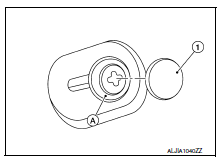
- Remove the remaining center console screws (A).
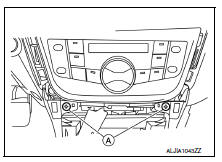
- Disconnect the harness connectors from the center console assembly and remove.
INSTALLATION
Installation is in the reverse order of removal.
 Steering column covers
Removal and Installation
REMOVAL
Remove the steering column cover screws (A), then remove the
steering column upper (1) and lower (2) covers.
NOTE:
Shown with steering wheel removed for ...
 Cluster lid A
Removal and Installation
REMOVAL
Release cluster lid A clips and pawls using a suitable tool.
: Pawl
Metal clip
Remove cluster lid A.
INSTALLATION
Installation is in the reverse ...
Other materials:
Front bumper
Exploded view
Grommet
Front bumper side bracket (RH)
Front under cover
Front air spoiler
Front bumper reinforcement
Front energy absorber
Front fog lamp (RH) (if equipped)
Front bumper lower grille
Front bumper fascia finisher (RH)
(if equipped)
Front fog lamp finisher (R ...
Front seat belt
Exploded View
D-ring anchor
Seat belt height adjuster cover
Seat belt buckle
Seat belt retractor
Seat belt height adjuster
Lap belt pre-tensioner harness
connector
Shoulder belt pre-tensioner
harness connector
Front
NOTE:
LH side shown; RH side similar.
Removal an ...
Precautions for Suspension
When installing rubber bushings, the final tightening must be carried
out under unladen conditions with tires
on ground. Spilled oil might shorten the life of rubber bushings. Be sure to
wipe off any spilled oil
Unladen conditions mean that fuel, engine coolant and lubricant are full. ...
