
Nissan Sentra Owners Manual: Bluetooth® settings
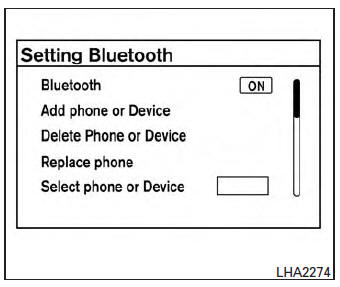
To access and adjust the settings for the Bluetooth® Hands-Free Phone System:
- Press the SETTING button.
- Use the TUNE/SCROLL knob to select “Bluetooth� and then press the ENTER button:
- Bluetooth
Select “On� or “Off� to turn the vehicle’s Bluetooth® system on or off.
- Add Phone or Device
To connect a phone to the system, see “Connecting procedure� in this section.
- Delete Phone or Device
Select to delete a phone from the displayed list. The system will ask to confirm before deleting the phone.
- Replace Phone
Select to replace a phone from the displayed list. When a selection is made, the system will ask to confirm before proceeding. The recorded phonebook for the phone being deleted will be saved as long as the new phone’s phonebook is the same as the old phone’s phonebook.
- Select Phone or Device
Select to connect to a previously connected phone from the displayed list.
- Show Incoming Calls
Select “Driver Only� to have incoming call information displayed only in the vehicle information display. Select “Both� to have incoming call information displayed in both the vehicle information display and the center display screen.
- Phonebook Download
Select to turn on or off the automatic download of a connected phone’s phonebook.
- Text Message
Select to turn on or off the vehicle’s text messaging feature.
- New Text Sound
Select to adjust the volume of the sound that plays when a new text is received by a phone connected to the Bluetooth® Hands-Free Phone System. The setting all the way to the left indicates that the new text sound will be muted.
- Show Incoming Text
Select “Driver Only� to have incoming text messages displayed only in the vehicle information display. Select “Both� to have incoming text messages displayed in both the vehicle information display and the center display screen. Select “None� to have no display of incoming text messages.
- Edit Custom Messages
Select to set a custom message that will be available with the standard options when sending a text message. To set a custom message, send a text message to your own phone number while the phone is connected to the system. Three custom messages can be set. Custom messages can only be set while the vehicle is stationary.
- Auto Reply
Select to turn on or off the Auto Reply function.
When enabled, the vehicle will automatically send a predefined text message to the sender when a text message is received while driving.
- Auto Reply Message
Select to choose the message that is sent when the Auto Reply function is enabled.
Choose from “I’m Driving� or one of the three custom messages stored in the system.
- Vehicle Signature On/Off
Select to choose whether or not the vehicle signature is added to outgoing text messages from the vehicle. This message cannot be changed or customized.
 Text messaging
WARNING
Laws in some jurisdictions may restrict
the use of some of the applications and
features, such as social networking and
texting.
Laws in some jurisdictions may restr ...
 Manual control
While using the Voice Recognition system, it is
possible to select menu options by using the
steering wheel controls instead of speaking voice
commands. The manual control mode does not
allow dial ...
Other materials:
Bcm branch line circuit
Diagnosis procedure
1.Check connector
Turn the ignition switch off.
Disconnect the battery cable from the negative terminal.
Check the terminals and connectors of the BCM for damage, bend and loose
connection (unit side and
connector side).
Is the inspection result normal?
YES > ...
Service Notice and Precautions for Road Wheel
Genuine NISSAN aluminum wheel is designed for each type of vehicle. Use
it on the specified vehicle only.
Use Genuine NISSAN parts for the road wheels, valve caps and wheel nuts.
Always use them after adjusting the wheel balance. For the balance
weights, use Genuine NISSAN aluminum
wh ...
Vehicle load capacity
Do not exceed the load limit of your vehicle
shown as “The combined weight of
occupants and cargo� on the Tire and
Loading Information label. Do not exceed
the number of occupants shown as
“Seating Capacity� on the Tire and Loading
Information label.
To get “the combined weight of ...
