
Nissan Sentra Service Manual: Basic inspection
Diagnosis and repair workflow
Workflow
OVERALL SEQUENCE
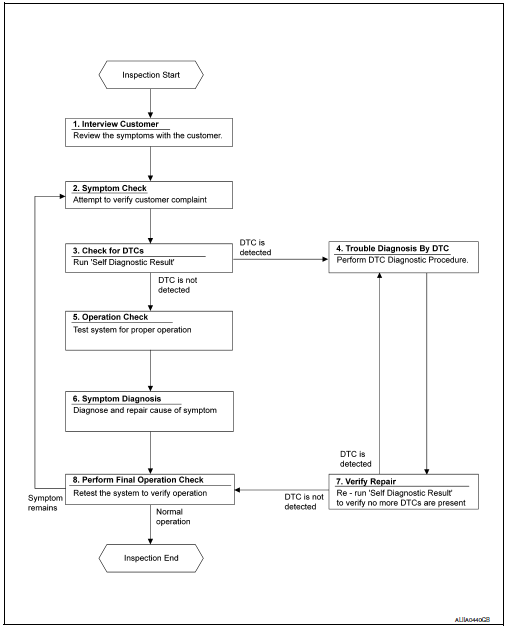
DETAILED FLOW
1.INTERVIEW CUSTOMER
Interview the customer to obtain as much information as possible about the conditions and environment under which the malfunction occurred.
>> GO TO 2.
2.SYMPTOM CHECK
Verify symptoms.
>> GO TO 3.
3.CHECK FOR DTCS
 With CONSULT
- Turn ignition switch ON.
- Select “Self Diagnostic Result” mode of “HVAC” using CONSULT.
- Check DTC.
Is any DTC detected? YES >> GO TO 4.
NO >> GO TO 5.
4.PERFORM DTC DIAGNOSTIC PROCEDURE
Perform the diagnostic procedure for the detected DTC. Refer to HAC-37, "DTC Inspection Priority Chart".
>> GO TO 7.
5.OPERATION CHECK
Perform the operation check. Refer to HAC-53, "Work Procedure" (automatic A/C) or HAC-157, "Work Procedure" (manual A/C).
>> GO TO 6.
6.SYMPTOM DIAGNOSIS
Check the symptom diagnosis table. Refer to HA-17, "Symptom Table".
>> GO TO 8.
7.VERIFY REPAIR
 With CONSULT
- Turn ignition switch ON.
- Select “Self Diagnostic Result” mode of “HVAC” using CONSULT.
- Check DTC.
Is any DTC detected? YES >> GO TO 4.
NO >> GO TO 8.
8.PERFORM FINAL OPERATION CHECK
Perform the operation check. Refer to HAC-53, "Work Procedure" (automatic A/C) or HAC-157, "Work Procedure" (manual A/C).
Does it operate normally? YES >> Inspection End.
NO >> GO TO 2.
 System description
Refrigeration system
Component part location
High-pressure service port
High-pressure pipe
Expansion valve
Low-pressure service port
Low-pressure flexible hose
Compressor
Refrige ...

Other materials:
Precautions on supplemental restraint system
This Supplemental Restraint System (SRS) section
contains important information concerning
the following systems:
Driver and passenger supplemental frontimpact
air bag (NISSAN Advanced Air Bag
System)
Front seat-mounted side-impact supplemental
air bag
Roof-mounted curtain side-impac ...
Fuel tank
Exploded View
Fuel filler cap
Grommet
Fuel filler tube
Clamp
Fuel filler hose
Fuel tank
Fuel tank mounting band (RH)
Fuel tank mounting band (LH)
Vent hose
Removal and Installation
WARNING:
Be sure to read “General Precautions” when working on the fuel
syste ...
ECU diagnosis information
Diagnosis sensor unit
DTC Index
DIAGNOSTIC CODE CHART
NOTE:
Follow the procedures in numerical order when repairing malfunctioning
parts. Confirm whether malfunction is
eliminated using air bag warning lamp or CONSULT each time repair is finished.
If malfunction is still
observed, proceed ...
