
Nissan Sentra Owners Manual: Adjusting the screen
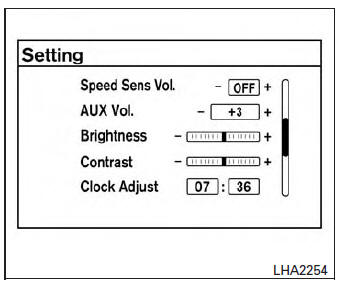
Without Navigation System
The procedure for adjusting the quality of the screen differs depending on the type of screen present on the vehicle.
For vehicles without Navigation System:
- Press the ENTER/SETTING button.
- Turn the TUNE-SCROLL knob to highlight the “Brightness� or “Contrast� key.
- Press the ENTER/SETTING button.
- Adjust the level using the TUNE-SCROLL knob and then press the ENTER/SETTING button to apply the adjustment.
- Do not adjust the Brightness or Contrast of the RearView Monitor while the vehicle is moving.
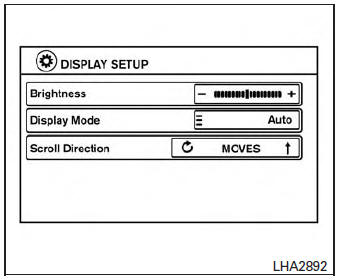
With Navigation System
For vehicles with Navigation System:
- Press the [
 ] button.
 - Touch the “Settings� key.
- Touch the “System� key.
- Touch the “Display� key.
- Touch the “Brightness� key and adjust the level to the desired setting.
- Do not adjust the display of the RearView Monitor while the vehicle is moving.
 Difference between predicted and actual distances
The distance guide line and the vehicle width
guide line should be used as a reference only
when the vehicle is on a level, paved surface. The
distance viewed on the monitor is for reference
only ...
 Operating tips
CAUTION
Do not use alcohol, benzine or thinner
to clean the camera. This will cause
discoloration. To clean the camera,
wipe with a cloth dampened with a diluted
mild cleaning agent and th ...
Other materials:
Front wiper auto stop signal circuit
Component function check
1. Check front wiper (auto stop) operation
Consult data monitor
Select “WIP AUTO STOP” of IPDM E/R DATA MONITOR item.
Operate the front wiper.
With the front wiper operation, check the monitor status.
Is the inspection result normal?
YES >> ...
B0091 Front side air bag satellite sensor LH
Description
DTC B0091 FRONT SATELLITE SENSOR LH
The front side air bag satellite sensor LH is wired to the air bag diagnosis
sensor unit. The air bag diagnosis
sensor unit will monitor the front side air bag satellite sensor LH for internal
failures and its circuits for communication
errors. ...
Tightening Torque Table (New Standard Included)
CAUTION:
The special parts are excluded.
The bolts/nuts in these tables have a strength (discrimination)
number/symbol assigned to the head
or the like. As to the relation between the strength grade in these tables
and the strength (discrimination)
number/symbol, refer to “DISCR ...
