
Nissan Sentra Service Manual: Rear disc brake
BRAKE PAD
BRAKE PAD : Inspection
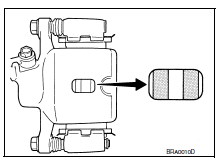
PAD WEAR
Check pad thickness from an inspection hole on caliper body. Check using a scale if necessary.
Wear limit thickness : Refer to BR-55, "Rear Disc Brake".
DISC ROTOR
DISC ROTOR : Inspection
APPERANCE
Check surface of disc rotor for uneven wear, cracks or damage. Replace if any abnormal conditions exist.
RUNOUT
- Check the wheel bearing axial end play before the inspection. Refer to RAX-5, "Inspection".
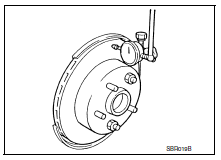
- Secure the disc rotor to the wheel hub and bearing assembly with wheel nuts at two wheel nut locations.
- Inspect the runout with a dial gauge, measured at 10 mm (0.39 in) inside the disc edge.
Runout : Refer to BR-55, "Rear Disc Brake".
- Find the installation position with a minimum runout by shifting the disc rotor-to-wheel hub and bearing assembly installation position by one hole at a time if the runout exceeds the limit value.
- Refinish the disc rotor if the runout is outside the limit even after performing the above operation. When refinishing, use Tool.
Tool number : 38-PFM92 ( � )
Thickness
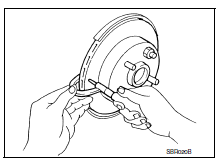
Check the thickness of the disc rotor using a micrometer. Replace the disc rotor if the thickness is below the minimum thickness.
Minimum thickness : Refer to BR-55, "Rear Disc Brake".
Thickness variation : Refer to BR-55, "Rear Disc Brake".
 Rear drum brake
BRAKE LINING
BRAKE LINING : Inspection
INSPECTION
Brake Lining
Check brake lining wear thickness (A). Check using a scale if
necessary.
Lining wear thickness (A) : Refer to BR-55, "Re ...

Other materials:
Wiring diagram
Eco mode system
Wiring diagram
...
Symptom diagnosis
The sport mode indicator lamp does not turn on
Description
The sport mode indicator lamp does not turn on when the sport mode switch is
operated.
Diagnosis procedure
1.Perform combination meter on board diagnosis
Perform combination meter on board diagnosis. Refer to mwi-16, "descriptio ...
Precaution for Supplemental Restraint System (SRS) "AIR BAG" and "SEAT
BELT PRE-TENSIONER"
The Supplemental Restraint System such as “AIR BAG” and “SEAT BELT PRE-TENSIONER”,
used along
with a front seat belt, helps to reduce the risk or severity of injury to the
driver and front passenger for certain
types of collision. Information necessary to service the system ...
