
Nissan Sentra Owners Manual: Instrument brightness control
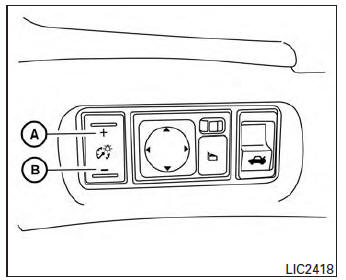
Push the “+� button A to increase the brightness of instrument panel lights when driving at night.
Push the “-� button B to decrease the brightness of instrument panel lights when driving at night.
 Headlight control switch
Type A
Type B
Lighting
When turning the switch to the
position,
the front parking, tail, license plate and
instrument panel lights come on.
When turning the switch to the
positi ...
 Turn signal switch
Turn signal
Move the lever up or down to signal the
turning direction. When the turn is completed,
the turn signal cancels automatically.
Lane change signal
To signal a lane change, ...
Other materials:
Rear window defogger feedback signal
Description
Turns the indicator lamp in the rear window defogger switch ON when operating
the rear window defogger.
Component function check
1.Check rear window defogger feedback signal
Check that the indicator lamp of rear window defogger switch is illuminated
when turning the rear window
...
6M/T
6M/T : Exploded View (LH)
Circular clip
Dust shield
Slide joint housing
Snap ring
Spider assembly
Boot band
Boot
Shaft
Damper band
Dynamic damper
Circular clip
Joint sub-assembly
Wheel side
6M/T : Disassembly and Assembly (LH)
DISASSEMBLY (WHEEL SIDE)
CAUTION:
...
Removal and installation
A/C SWITCH ASSEMBLY
Removal and Installation
REMOVAL
Remove the CVT shift selector finisher (CVT: RE0F11A). Refer to TM-253,
"Removal and Installation".
Remove the MT shift selector finisher (6MT: RS6F94R). Refer to TM-22,
"Removal and Installation".
Remove the A/ ...
